 Download Online Help
 Print
|
|
|
|
|


There are two types of E/C compliances: A/C E/C compliance and P/N E/C compliance. Select the Compliance  button to view a history of compliance records associated with an E/C. When the E/C is accomplished on a Work Order (Production or Shop) or Repair Order, a record of the E/C compliance for all tail numbers or part serial numbers will be kept in this window.
Note: The Engineering Compliance window has been updated and is now organized by A/C Compliance and A/C, P/N Compliance and P/N. This is useful for more efficient data gathering. This is a view only window and the information in this window cannot be edited or updated in this window.
The user also has the option to select the Select  button and view in Query Mode the details of the actual Work Order or Repair Order which the E/C was complied on.
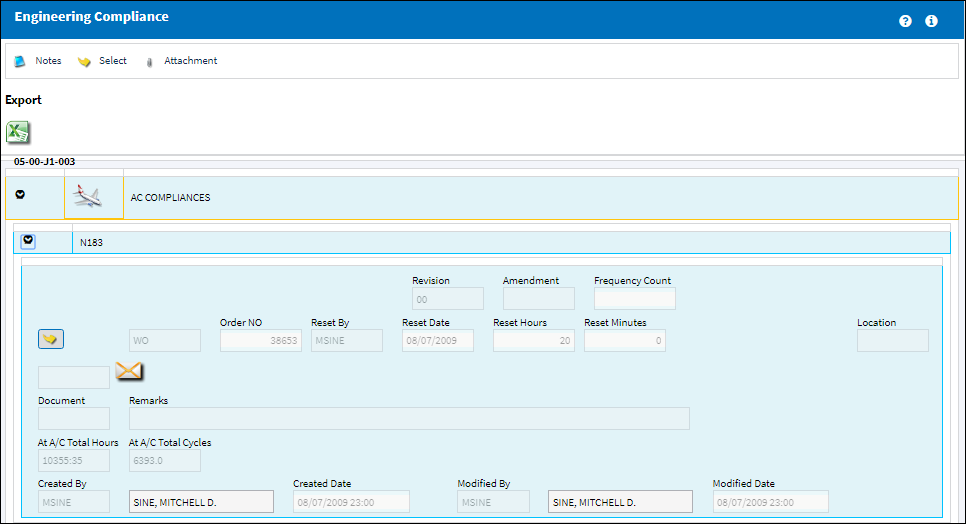
The following options/information is available in this window:
_________________________________________________________________________
Revision
The Revision of the E/C at the time of compliance.
Amendment
The Amendment of the E/C at the time of compliance.
Frequency Count
The E/Cs current frequency status. For example, there are 4 Total Frequencies to the E/C A-Check (A1, A2, A3 and A4). This P/N may be on the 3rd Frequency Count (A3) out of the 4 Phases. This field tells planning which frequency the record is currently on, and which Called On E/C dependencies to pull onto the Work order.
Note: Frequency Count and the Completed NO fields must match the Completed/ Frequency Flag for the proper E/C Called On functionality.
Order NO
The relevant Repair or Work Order Number the E/C was complied against.
Reset By
The user that accomplished the Work Order (Production or Shop) Closing or Repair Order Receiving.
Reset Date
The date that the E/C was complied with through the Work Order (Production or Shop) bgin Closed or the Repair Order being received.
Reset Hours/Minutes
The time at which this E/C was complied with through the Work Order (Production or Shop) being Closed or the Repair Order being received.
Location
The location in which the E/C was complied at.
Document
The Document information entered in Manual Compliance.
Remarks
Any general remarks about the compliance event.
Created By
The user who created the record.
Created Date
The date the record was created.
Modified By
The user who last modified the record.
Modified Date
The date the record was last modified.
_________________________________________________________________________
Download Online Help
Print
|
©1997-2018 Trax USA Corp. All rights reserved. This manual may not be copied, photocopied, reproduced, translated, or converted to any electronic or machine-readable form, in whole or in part, without prior written approval from Trax USA Corp. |
 |