
 Share
Share
 Print
Print
|
|
|
|
|


Modify an existing file in TraxDoc as follows:
- Click on the file to select it, (the highlighted record indicates it is selected).
- Right-click and select ‘Modify File’. The file will open in its native application.
The computer must have the application installed in order to open the file.
- Make the required changes and save the file in the windows application.
- Enter Modification Details and click the Save button in the TraxDoc Modify Document Window to save the changes in TraxDoc.
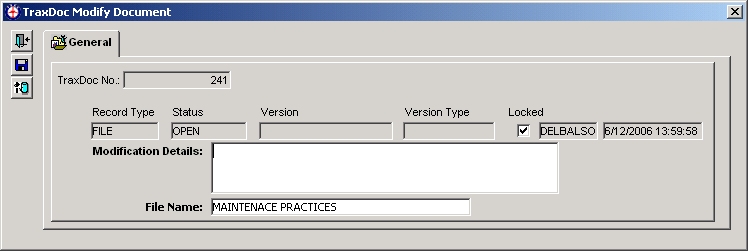
Make sure that you Click Save in the TraxDoc Modify Document window.
If you do not save in the TraxDoc Modify Document Window the changes to the file will not be saved in TraxDoc.
For more information, refer to the topic regarding Embedding and Linking Files in a TraxDoc Document.
Share
Print
|
©1997-2026 Trax USA Corp. All rights reserved. This manual may not be copied, photocopied, reproduced, translated, or converted to any electronic or machine-readable form, in whole or in part, without prior written approval from Trax USA Corp. |
 |