
 Share
Share
 Print
Print
|
|
|
|
|


TraxDoc Explorer Favorites
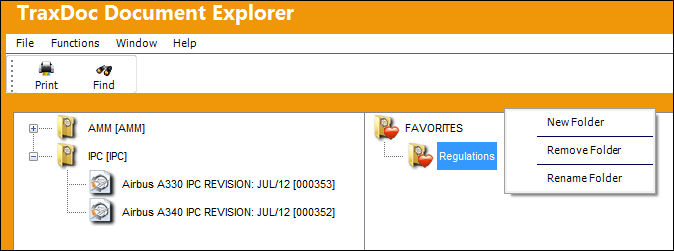
The right pane of the TraxDoc Explorer Window contains a Favorites List. The Favorites List is set up by users and contains shortcuts to TraxDoc Documents. Each User Login Name will have its own Favorites list. As revisions to the TraxDoc documents become available in the TraxDoc Explorer the Favorites List is automatically updated to reflect the latest TraxDoc revision.
Create Favorites as follows:
- Create folders by right clicking on the default FAVORITES Folder or an existing Folder and select ‘New Folder.'
- Right click on a folder and select ‘Rename Folder’ to rename it.
- Right click on folder and select ‘Remove Folder’ to delete it.
Note that all the shortcuts contained in the folder will also be deleted. - Add a shortcut to the Favorites List by selecting a TraxDoc Document and dragging it to a folder in the Favorites List.
- Delete a TraxDoc Favorite from the Favorites list by right clicking on it and selecting ‘Remove Favorites.'
- Open a TraxDoc Document from the Favorites List by right clicking on it and selecting ‘View.'
Share
Print
|
©1997-2026 Trax USA Corp. All rights reserved. This manual may not be copied, photocopied, reproduced, translated, or converted to any electronic or machine-readable form, in whole or in part, without prior written approval from Trax USA Corp. |
 |