
 Share
Share
 Print
Print
|
|
|
|
|


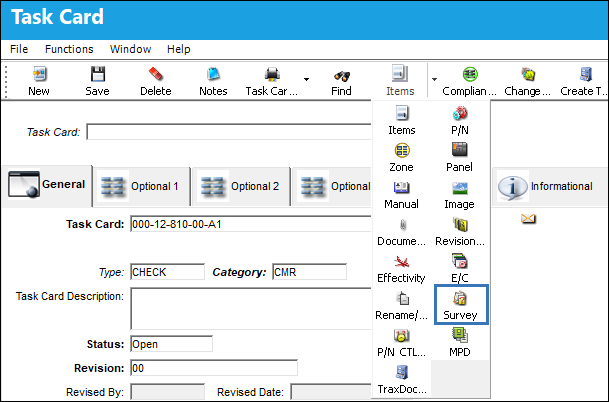
Select the Survey  button to set up survey questions for the Task Card.
In the Task Card Survey window enter the questions to be asked, saving each question one at a time.
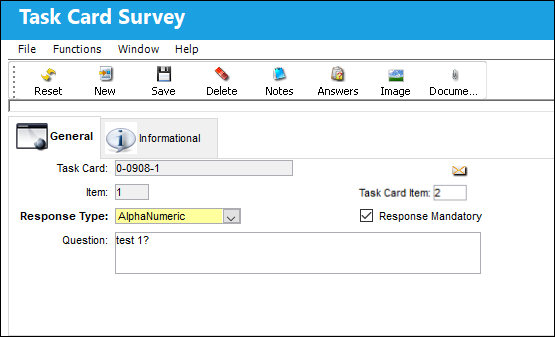
The following information/options are available in this window:
_____________________________________________________________________________________
Task Card
The Task Card / Job Card that details the scheduled maintenance work.
Task Card Item 
The Task Card Item linked to the survey question.
Item
The Item (question) number of the Task Card Survey.
Response Type drop down
This determines the functionality and the type of response that is acceptable for the question(s).
Alpha Numeric - The response can include both letters and numbers.
Numeric - The response will include only numbers.
Alpha Numeric Range - The response will consist of a range and both letters and numbers can be used.
Numeric Range - The response will consist of a range and only numbers can be used. Based on the answer, supplemental functionality may be triggered affecting additional E/Cs.
Yes/No - The response will be either Yes or No. Based on the answer, supplemental functionality may be triggered affecting additional E/Cs.
Multiple Choice - The response will be a selection made from one of the available options provided. Based on the answer, supplemental functionality may be triggered affecting additional E/Cs.
Response Mandatory Checkbox
Select this checkbox if the response is mandatory.
Question
The question that will appear to the user in the survey.
_____________________________________________________________________________________
Share
Print
|
©1997-2026 Trax USA Corp. All rights reserved. This manual may not be copied, photocopied, reproduced, translated, or converted to any electronic or machine-readable form, in whole or in part, without prior written approval from Trax USA Corp. |
 |