
 Share
Share
 Print
Print
|
|
|
|
|


From the Task Card, select the Survey  button and the Task Card Survey window opens.
Select the Response Type 'Numeric Range' to allow users to answer the question with a range using only numbers.
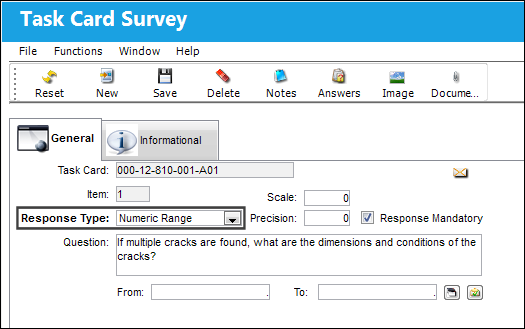
The following information/options are available in this window:
_____________________________________________________________________________________
Task Card
The Task Card / Job Card that details the scheduled maintenance work.
Item
The Item (question) number of the Task Card Survey.
Scale
Defines the number of characters to be entered to the left of a decimal place (i.e. whole number).
Response Type
This determines the functionality and the type of response that is acceptable for the question. For additional information regarding the other response types, refer to the Survey Button.
Precision
Defines the number of characters to be entered to the right of a decimal place.
Response Mandatory checkbox
Select this checkbox if the response is mandatory.
Question
The question that will appear to the user in the survey.
From
Beginning value of defined range.
To
End value of defined range.
Answer (E/C Control)  button
Select this button to set the Schedule Control if the response to the question falls in between the specified values in the From and To fields. For additional information, refer to the Answer Button, via Numeric Range.
System Notification  button
Select this button to display a notification message. For additional information, refer to the Notification button.
_____________________________________________________________________________________
Share
Print
|
©1997-2026 Trax USA Corp. All rights reserved. This manual may not be copied, photocopied, reproduced, translated, or converted to any electronic or machine-readable form, in whole or in part, without prior written approval from Trax USA Corp. |
 |