 Download Online Help
 Print
|
|
|
|
|


Task Card Shop, Optional 1 Tab
The Task Card, Optional 1 tab allows the user to add the following optional information to the Task Card:
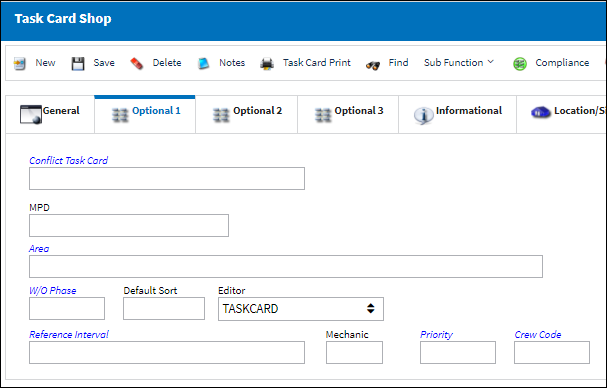
The following options/information is available in this window:
_________________________________________________________________________
Conflict Task Card
If a Task Card is specified here, it indicates that the current Task Card should not be performed should it appear in a Work Order with the specified Task Card.
Note: If an Engineering Control with a Conflict Task Card is removed from a W/O then added back to that W/O, or if the E/C (with the Conflict T/C) is revised and re-authorized while linked to the W/O, the original Conflict Task Card will be removed from the work package.
MPD
The Maintenance Planning Document reference for this Task Card.
Area
The Area of the aircraft which this Task Card is related to, as defined in the Trans Code.
Work Order Phase
The phase of the Work Order on which the Task Card work is carried out on.
Default Sort
The default sort priority of this Task Card when it is printed on a Work Order.
Editor
The application that will be used to edit the Task Card information. The application will also be used to edit Task Cards when those Task Cards are placed on Work Orders via Production/Update/Work Order. Selectable formats include: Word ®, TASKCARD, or the default Powerbuilder ® RTF (i.e. NONE). This is a customized layout for the Task Card.
Note: Using the Editor drop-list on the Optional 1 Tab of the Task Card, the user can choose the editor that will be used to edit each Task Card Item (Step) on an individual basis. The user may set the value for all new Task Cards with the following configuration switch.
 TCEDITOR - (Task Card Item Editor) Enter the default application editor to be used in the Config Other field.
Note: This Editor functionality is only supported when using Oracle ® version 8i and up. Also, this functionality is compatible with Microsoft ® Word 2000 and later versions.
NONE - This is the system default editor and should be entered in all capital letters.For additional information regarding how the NONE Editor functions, refer to NONE (Default TRAX Editor) via the Task Card Editor section of the Engineering - T/C Training Manual.
WORD - This should be entered in all capital letters. This application is a Rich Text Editor with embedded images. For additional information regarding how the WORD Editor functions, refer to the WORD Editor via the Task Card Editor section of the Engineering - T/C Training Manual.
TRAXDOC - The TRAXDOC Editor uses uploaded Style Sheets in TRAXDOC as a template for a print. The Task Card print layout can be defined by a TRAXDOC Style Sheet. Task Cards of each TRAXDOC can have a different layout based on the criteria of the TRAXDOC (i.e. fleet type, customer). TRAXDOC allows the user to modify Task Cards using Style Sheets. The TRAXDOC Editor is not a RTF Editor. When the TRAXDOC Editor is selected, the following field and button appears.
For additional information regarding how the TRAXDOC Editor functions, refer to the TRAXDOC Editor via the Task Card Editor section of the Engineering - T/C Training Manual.
STYLESHEET - The Style Sheet Editor is a RTF (Rich Text Format) Editor which allows the user to enter the Task Card item text using the available RTF options. Please see descriptions for the various options and buttons below.
Reference Interval
The Task Card / Non-Routine Task Card reference interval (i.e. schedule for this work requirement. This is an informational field and the schedule is derived from the E/C the Task Card is associated to).
Mechanic
The number of mechanics needed to complete this task. This is informational only.
Priority
The priority of the Task Card (i.e. Normal, Urgent).
Crew Code
Any crew code associated with the Task Card.
_________________________________________________________________________
Download Online Help
Print
|
©1997-2018 Trax USA Corp. All rights reserved. This manual may not be copied, photocopied, reproduced, translated, or converted to any electronic or machine-readable form, in whole or in part, without prior written approval from Trax USA Corp. |
 |