 Download Online Help
 Print
|
|
|
|
|


Task Card Shop, Allowed Locations Tab
Select the Task Card, Allowed Locations tab allows the user to add a Location/Site to a Task Card. The new Task Card Location can be added to a Work Order that was created with a different Location.
Note: This tab is only available if Switch  LOCSITEALLOWED is set the Yes. This tab can still be edited/updated when Switch TCVIAREV is set to Yes.
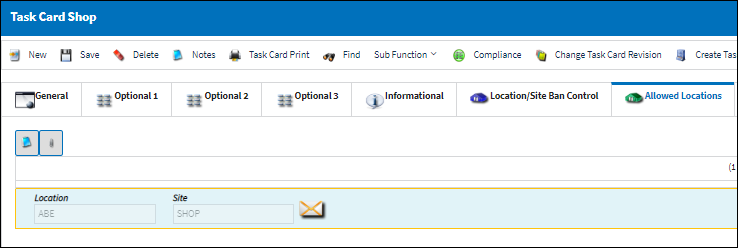
The following options/information is available in this window:
_________________________________________________________________________
Location
The Location for maintenance events, inventory stores, orders, transactions, or training events.
Site
The site where the work should be carried out (if applicable).
_________________________________________________________________________
Multiple records can be added or removed through the New  and Delete
 buttons.
Relevant information can be included through the Notes  and Attachment
 buttons.
Notice the W/O Location is different from the Location in the Task Card. The Location for the above Task Card is ABE,
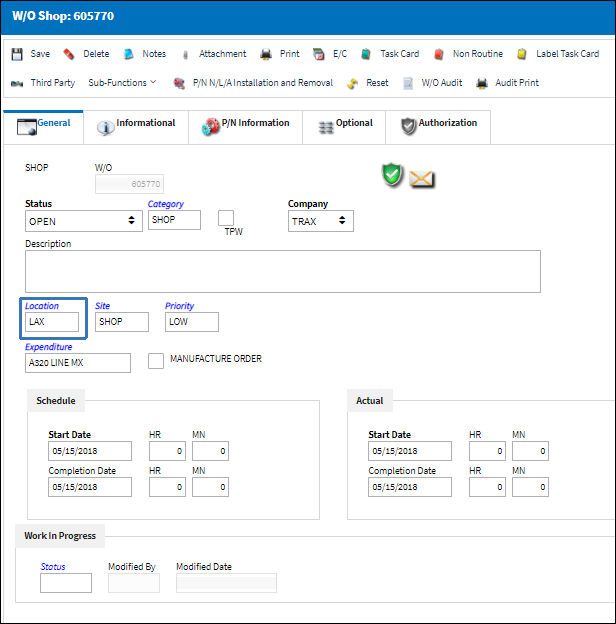
In the W/O Task Card window, a warning sign appears if the allowed Location/Site in the Task Card doesn't match the Location/Site of the W/O.
Error Summary: Task Card P/N-222 does not have an allowed Location/Site that matches with the Location/Site of this W/O.
The W/O Task Card can still be saved.
Information: Data Saved Successfully.
When adding the Task Card to the W/O Engineering Control, a soft warning appears saying that the allowed Task Card location does not match the allowed location for the W/O.
Error Summary: Task Card P/N-222 does not have an allowed Location/Site that matches with the Location/Site of this W/O.
Since it is a soft warning, the user is still allowed to save the Task Card.
Information: Data Saved Successfully.
Download Online Help
Print
|
©1997-2018 Trax USA Corp. All rights reserved. This manual may not be copied, photocopied, reproduced, translated, or converted to any electronic or machine-readable form, in whole or in part, without prior written approval from Trax USA Corp. |
 |