 Download Online Help
 Print
|
|
|
|
|


Inventory Print
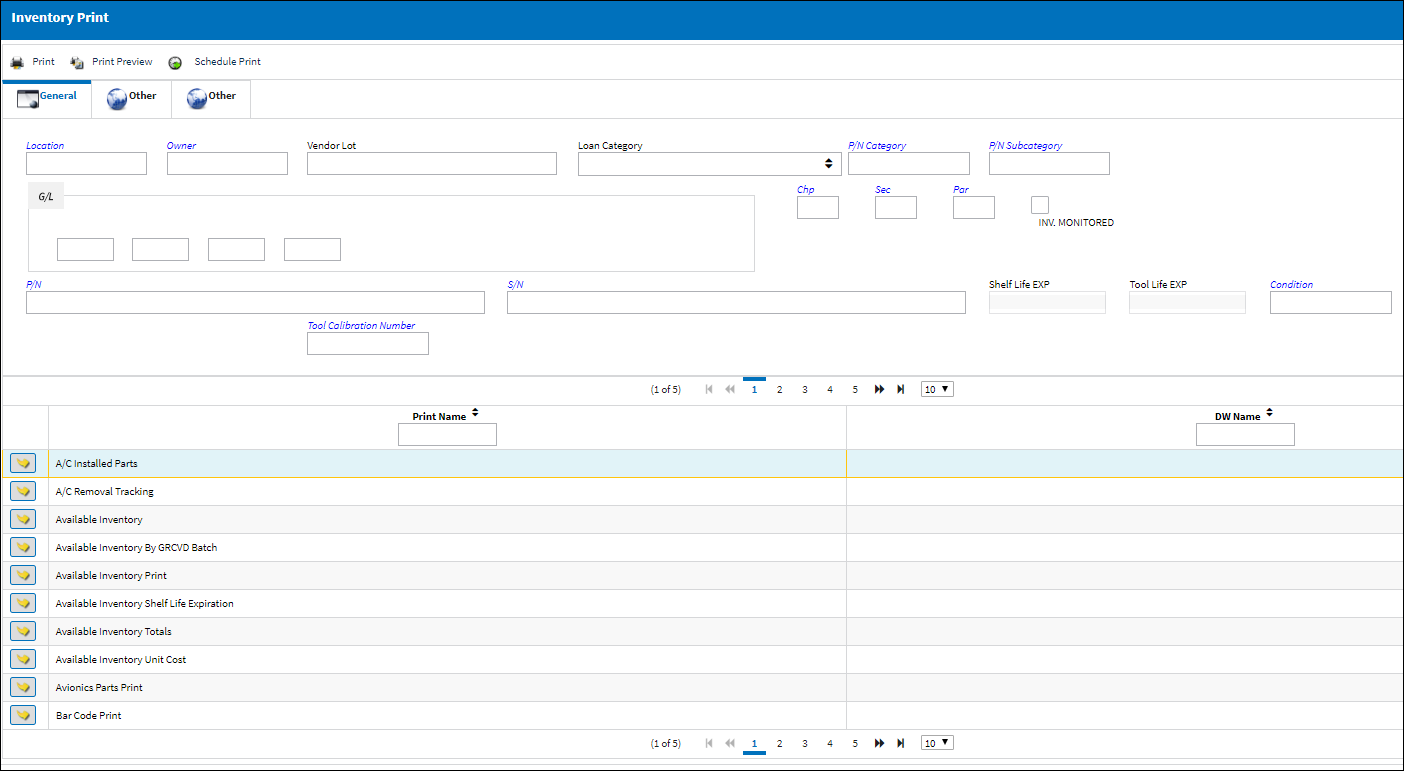
The Inventory Print Window allows the user to print and then view reports that contains Inventory information.
Note:These are customized prints. Print layouts and options may vary per operator.
The following options/information is available in this window:
_________________________________________________________________________
Location
The Location for maintenance events, inventory stores, orders, transactions, or training events.
Owner
The name of the owner of the part, when applicable.
Vendor Lot
The system code for the service/part provider.
Loan Category
Loan Part Category (short, long, or pool).
P/N Category
The type of part based on A/C and part description.
P/N Sub Category
The Part Number's sub-category.
G/L
The General Ledger account(s) reference used for financial control throughout the system.
Chp
Enter the Chapter number associated with the selection.
Sec
Enter the Section associated with the selection.
Par
Enter the Paragraph associated with the selection.
P/N
The Part Number reference for the aircraft part.
S/N
The Aircraft's Serial Number which is provided by the manufacturer. This serial number is like a registration number, but it is not dependent on a country code and therefore never changes.
Shelf Life EXP
The shelf life expiration date of the part, as applicable.
Tool Life EXP
The tool life expiration date of the part, as applicable.
Condition
The condition of the part.
Tool Calibration Number
This is a unique number used to define a tool.
_________________________________________________________________________
Download Online Help
Print
|
©1997-2018 Trax USA Corp. All rights reserved. This manual may not be copied, photocopied, reproduced, translated, or converted to any electronic or machine-readable form, in whole or in part, without prior written approval from Trax USA Corp. |
 |