
 Share
Share
 Print
Print
|
|
|
|
|


The Engineering Control Authorization, Affected manuals tab allows the user to review any manuals that have been associated to the E/C. The user can also has the option to update the information in this tab.
To create a new record, go to the Affected Manuals Tab and select the New  button.
Note: The user has the option to enter as many manuals as desired by clicking on the New button. Additionally, the user also has the option to remove manuals by utilizing the Delete  button.
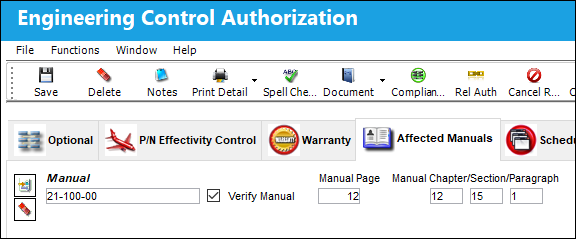
The data entered on this tab is informational only. The manuals will show on the Engineering Detail print and the E/C Affected Manuals print, but will not be added to Work Packs.
The following information/options are available in this window:
_____________________________________________________________________________________
Manual
Related Manual reference to be utilized for the record.
Verify Manual checkbox
Select this checkbox to validate that the manual selected in the Manual field is currently loaded in the Manual Control, Manual Master via the Library module. If the Verify Manual checkbox is checked and the manual does not appear in the Library, an error is prompted.
If the checkbox is not checked, the user can enter any manual name in the Manual field. This is a free text field.
Manual Page
Enter the specific Manual Page that is related to this E/C.
Manual Chapter/Section/Paragraph
The ATA chapter/section/paragraph, as applicable.
_____________________________________________________________________________________
If the Switch  ECMNLDUP is set to Yes, the system will not check for duplicate entries of Manuals via Engineering/Update/E/C/Affected Manuals Tab.
Share
Print
|
©1997-2026 Trax USA Corp. All rights reserved. This manual may not be copied, photocopied, reproduced, translated, or converted to any electronic or machine-readable form, in whole or in part, without prior written approval from Trax USA Corp. |
 |