
 Share
Share
 Print
Print
|
|
|
|
|


Insurance Print
The Insurance Print window allows the user to query for and print an Insurance Claim.
As with the majority of search queries in TRAX, it is recommendable to enter as many search filters as possible to minimize the search result. Select search criteria and click on the Find  button.
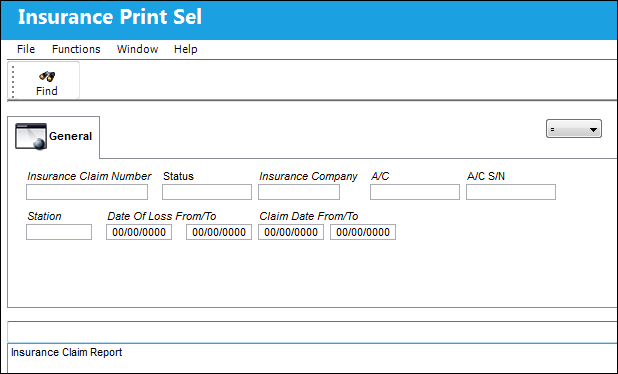
The following information/options are available in this window:
_____________________________________________________________________________________
Insurance Claim Number
The Insurance claim number, which applies to the part of the order.
Status
The status of the Insurance Claim (Pending, Accepted, Rejected).
Insurance Company
The company associated with this Insurance Claim.
A/C
The individual aircraft tail number. The aircraft associated with the Insurance Claim.
A/C S/N
The Aircraft's Serial Number which is provided by the manufacturer. This serial number is like a registration number, but it is not dependent on a country code and therefore never changes.
Station
The station associated with the Insurance Claim.
Date Of Loss From/To
The date of the loss associated with the Insurance Claim.
Claim Date From/To
The date of the Insurance Claim.
_____________________________________________________________________________________
Share
Print
|
©1997-2026 Trax USA Corp. All rights reserved. This manual may not be copied, photocopied, reproduced, translated, or converted to any electronic or machine-readable form, in whole or in part, without prior written approval from Trax USA Corp. |
 |