
 Share
Share
 Print
Print
|
|
|
|
|


Order Print
The Order Print allows the user to query for and print various reports related to Orders from this window.
There are additional print options available from window that are not included in the screenshot below.
As with the majority of search queries in TRAX, it is recommendable to enter as many search filters as possible to minimize the search result. Select search criteria and click on the Find  button.
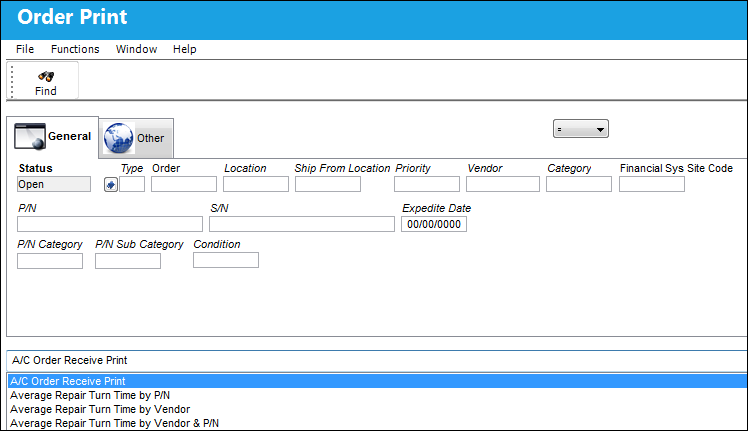
The following information/options are available in this window:
_____________________________________________________________________________________
Status
The current status of the order.
Type
The order type.
Order
The type of order and the order number for the transaction.
Ship From Location
Location from which order has been shipped.
Priority
The priority placed on the transaction (e.g., routine, AOG, etc.).
Vendor
The Vendor or the Customer associated to the order (depending on the selection of the drop down).
Category
The appropriate category for this transaction.
Financial Sys Site Code
The order's financial system site code.
P/N
The Part Number reference for the aircraft part.
S/N
The Serial Number for the specific serialized part.
Expedite Date
The accelerated delivery date of this Order; rushed order based part requirement and order priority.
P/N Category
The category of the part as defined in Settings/ Explorer/ System Transaction Code Explorer/ Settings/ P/N Category (e.g. Rotable, Consumable, Repairable) and entered for the particular part in the P/N Master.
P/N Sub Category
The Sub Category for each part.
Condition
The condition of the part.
_____________________________________________________________________________________
Share
Print
|
©1997-2026 Trax USA Corp. All rights reserved. This manual may not be copied, photocopied, reproduced, translated, or converted to any electronic or machine-readable form, in whole or in part, without prior written approval from Trax USA Corp. |
 |