
 Share
Share
 Print
Print
|
|
|
|
|


Invoice Print
The Invoice Print allows the user to query for and print an Invoice.
As with the majority of search queries in TRAX, it is recommendable to enter as many search filters as possible to minimize the search result. Select search criteria and click on the Find  button.
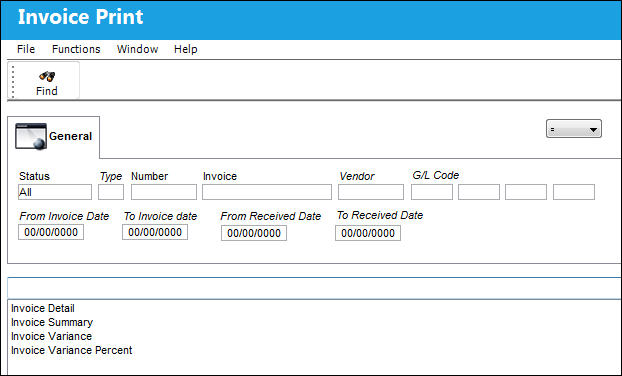
The following information/options are available in this window:
_____________________________________________________________________________________
Status
Status of the invoice.
Type
The Customer the Invoice is for.
Number
The invoice number for orders that have been invoiced through the Link module. For more information refer to the topic Invoice Entry via the Link manual.
Invoice
The reference number (identification) on the received invoice and previously entered. This number is usually printed on the received invoice.
Vendor
The system code for the service/part provider.
G/L Code
The G/L Account codes consist of four fields each with a maximum length of EIGHT (8) alpha numeric characters. Each field in the account code will represent (or reference) some entity within your organization. A standard method of filling each field must be adopted before setting up the accounts. The two common standards that may be adopted for the fields are as follows:
From Invoice Date
Enter a From date for the search parameter.
To Invoice Date
Enter a To date for the search parameter.
_____________________________________________________________________________________
Share
Print
|
©1997-2026 Trax USA Corp. All rights reserved. This manual may not be copied, photocopied, reproduced, translated, or converted to any electronic or machine-readable form, in whole or in part, without prior written approval from Trax USA Corp. |
 |