
 Share
Share
 Print
Print
|
|
|
|
|


Order Status, Other Tab
The Order Status, Other Tab is used to query for Orders by filtering through additional information of the various order types based on the following search criteria. Enter any of the below search criteria to query for a desired Order and select the Find  button.
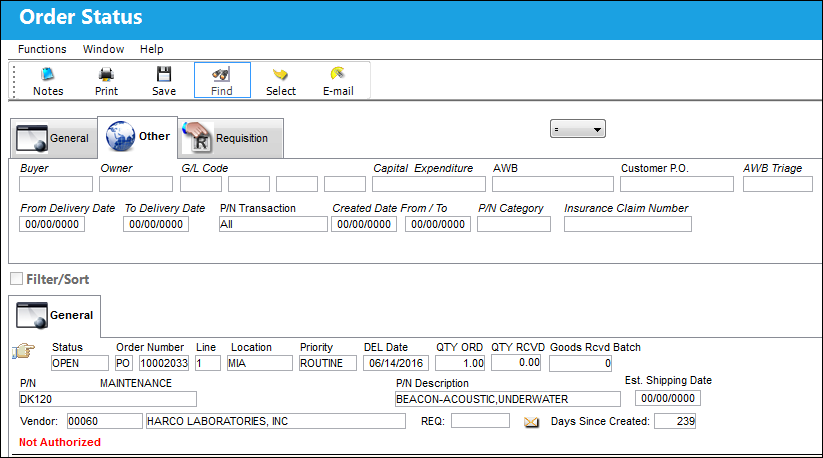
The following information/options are available in this window:
_____________________________________________________________________________________
Buyer 
Individual who issued the order to buy the part. The buyer can be created via P/N Master/Inventory Levels button.
Owner
The owner who is associated with this part on the order. The purpose of the owner code is to separate other companies' stock from your own. This is helpful if you hold consignment inventory or loan parts. When an owner is associated with the part, the part will indicate that it is consigned (with the Consigned icon), Loaned, Pool, or Managed via Inventory/Update/Inventory Transaction. The part will indicate that it is consigned with the Consigned icon. Consigned parts are those that are received by your company, but do not become officially yours unless the part is actually used on an aircraft. Consigned parts do not generate journal transactions or fixed asset records until the issue of the part to the aircraft. For additionally information on consignment inventory, please refer to the Purchasing Consigned Part (P/Os) section of this manual.
G/L Code
The General Ledger accounting code for the order. The order G/L will default to the Part Number G/L as defined in the P/N Master, Costing tab. However, this field may be overwritten for any given order.
When G/L Interface Switch  COMPANYMULTI is set to 'Yes,' this field will be populated with the G/L Account that matches the Company entered into the Company field of the P/O header window. When set to 'No,' this field will function as described above. For detailed information refer to Switch COMPANYMULTI via the G/L Interface Switches Manual.
 When Orders Switch CAPEXGL is set to Yes, the Capital Expenditure transaction code will contain the Default G/L field (instead of the Cost Center field). When this Capital Expenditure is entered into an order's Optional tab, the transaction code's G/L (if populated) will override the order's G/L field in the General tab.
Capital Expenditure
The Capital Expenditure code describes the way in which a cost is to be accounted for.
 The Cost Center associated to the Capital Expenditure transaction code entered into this field is displayed as part of the G/L Account of the ordered part. The Cost Center is displayed only after this ordered part is received. For more information, refer to the Requisition Detail, Optional Tab via the Requisition Training Manual.
If the Requisition and Line item linked to the order in the General tab contains a Capital Expenditure, the Capital Expenditure is auto-populated in the order's optional tab. For more information, refer to the Requisition Detail, Optional Tab via the Requisition Training Manual.
Depending on the setting of Orders Switch CAPEXGL, either the Cost Center field or the Default G/L field is available within the Capital Expenditure transaction code.
When set to Yes, the Capital Expenditure transaction code will contain the Default G/L field (instead of the Cost Center field). When this Capital Expenditure is entered into an order's Optional tab, the transaction code's G/L (if populated) will override the order's G/L field in the General tab.
When set to No, the Capital Expenditure transaction code will contain the Cost Center field (instead of the Default G/L field). When this Capital Expenditure is entered into an order's Optional tab, the transaction code's Cost Center will override the order G/L's Cost Center at order receiving. The Journal Entries for the closed order will contain the Capital Expenditure's Cost Center in the G/L.
AWB
The airway bill number related to the part.
Customer P.O.
For Third Party purchase, if purchase is on behalf of a customer the PO number may be entered here. Additional Use - if a Sales Order is generated in the system for the service requirement, it may cross reference here as well. This is to be defined by the company procedures. This does not invoice or charge the customer for any service provided. It is only used as a reference number.
AWB Triage 
The triage code associated to an AWB/Order combination.
From / To Delivery Dates
The starting and ending dates of the expected delivery date constraint.
P/N Transaction
The P/N transaction type, ALL, inventory, and non-inventory.
Created Date From/To
The "From" and "To" order creation date search constraints.
P/N Category
The category of the part as defined in Settings/ Explorer/ System Transaction Code Explorer/ Settings/ P/N Category (e.g. Rotable, Consumable, Repairable) and entered for the particular part in the P/N Master.
Insurance Claim Number
The Insurance claim number, which applies to the part of the order.
For additional information, please refer to the Insurance Claim section of the Orders manual.
_____________________________________________________________________________________
Share
Print
|
©1997-2026 Trax USA Corp. All rights reserved. This manual may not be copied, photocopied, reproduced, translated, or converted to any electronic or machine-readable form, in whole or in part, without prior written approval from Trax USA Corp. |
 |