
 Share
Share
 Print
Print
|
|
|
|
|


Order Status
The Order Status program is a tool used to keep an overview of open orders in the system, remind vendors of open or overdue orders, and keep track of outstanding deliveries. It provides a list of open orders in the system according to your filter settings and allows the user to print or e-mail the list.
The Order Status, General Tab is used to query for Orders based on the following search criteria. Enter any of the below search criteria to query for a desired Order and select the Find  button.
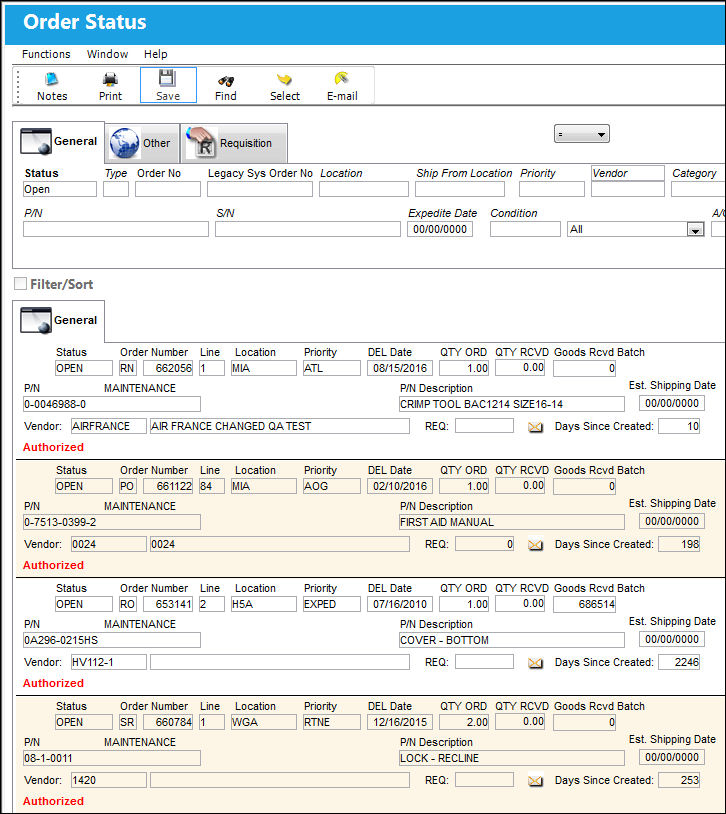
The Order Status, Other Tab and Order Status, Requisition Tab can also be utilized to filter search criteria.
Query:
The following information/options are available in this window:
_____________________________________________________________________________________
Status
Enter the status of the order to query for.
Type
Type of Order. By order type, certain receiving and financial behaviors will be assigned to the order at receiving of the various Order Types. These order types exist under the Orders or Customer Orders Modules exclusively. All Order Types are Hard Coded into the programming syntax.
Order No
The type of order and the order number for the transaction.
Legacy Sys Order No
The legacy number related to the order. The legacy number is typically identified and used by customers during implementation to cross reference their old systems order number to the new systems order number.
Location
The Location for maintenance events, inventory stores, orders, transactions, or training events.
Ship From Location
Location from which order has been shipped.
Priority
The priority placed on the transaction (e.g., routine, AOG, etc.). For additional information and functionality, refer to the Priority transaction code via the Orders Transaction Codes.
Vendor
The system code for the service/part provider.
Category
The appropriate category for this transaction. This also works with the Authorization Process as defined against the Order Type.
Financial Sys Site Code
The order's financial system site code.
P/N
The Part Number reference for the aircraft part.
S/N
The Serial Number for the specific serialized part.
Expedite Date
The accelerated delivery date of this Order; rushed order based part requirement and order priority. Expedite Date may be defaulted as defined in the Order Priority System Tran Code.
Condition
The condition of the part.
Inventory Type drop down
The type of inventory the item is registered as in the system. The available options are All, General, GSE and Maintenance Inventory. All is set as the default.
A/C
The individual aircraft tail number.
_____________________________________________________________________________________
Results:
Per default, only open orders will be displayed. Adjust the Status field in the filter settings to see closed orders.
In the Order Display section, the different orders will be displayed with the following information:
_____________________________________________________________________________________
Status
The current status of the order.
Order Type
Type of Order. By order type, certain receiving and financial behaviors will be assigned to the order at receiving of the various Order Types. These order types exist under the Orders or Customer Orders Modules exclusively. All Order Types are Hard Coded into the programming syntax.
Order Number
The type of order and the order number for the transaction.
Line
The specific Line item of the Order. Each Line item could represent a different part included in the same order.
Location
The Location for maintenance events, inventory stores, orders, transactions, or training events.
Priority
The priority placed on the transaction (e.g., routine, AOG, etc.).
Delivery Date
The date when the part(s) is/are expected to be received.
Qty ORD
The number of parts for the transaction.
Qty RCVD
The quantity of parts that were received.
Goods Rcvd Batch
The original inventory number assigned to the part or group of parts when initially introduced/received into inventory. This number will remain the same for a part even if/when the part's Batch number changes.
P/N and P/N Description
The Part Number reference for the aircraft part. The description of the part.
Estimated Shipping Date
The estimated shipping date.
Vendor
The system code for the service/part provider.
Req
List of required parts for either a maintenance item or for restocking.
Days Since Created
The amount of days since the order was created.
_____________________________________________________________________________________
Select the orders you want to send reminders for by selecting them (they will be highlighted in blue). Selection of several order lines from different orders is possible.
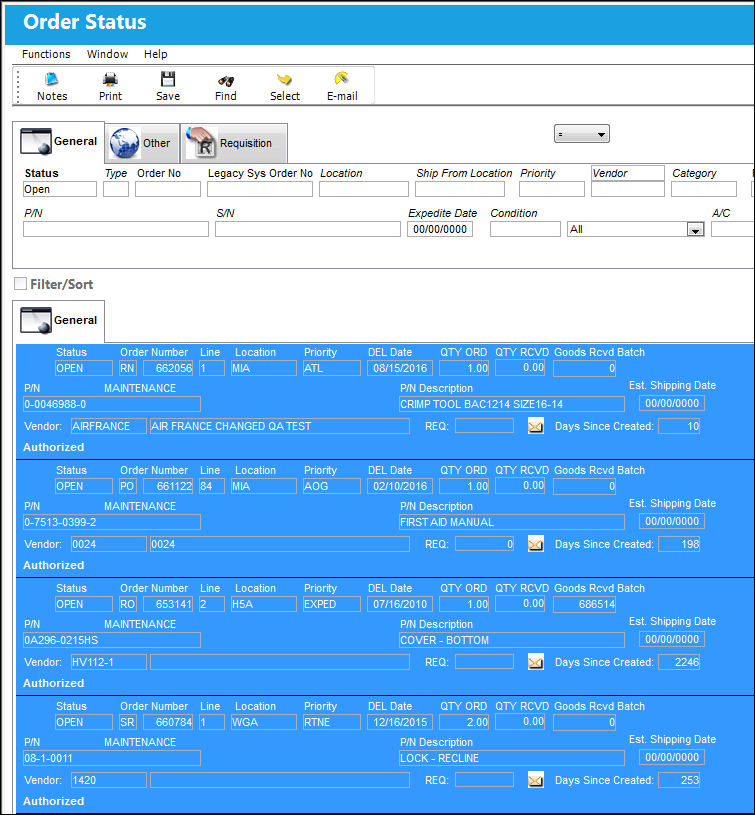
Select the E-Mail  button to be directed to the e-mail screen.
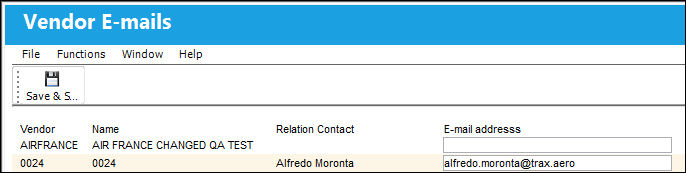
For each vendor a line with the vendor code, name, contact information and e-mail address will be displayed. The e-mail address is defaulted from the Vendor Master and can be modified (i.e. when a specific person should be contacted instead of the regular customer service e-mail address).
When all addresses are entered correctly, select the Save  button in order to send the reminder e-mail to the suppliers.
Additional buttons that offer functionality include the Notes  and Print
  buttons.
Share
Print
|
©1997-2026 Trax USA Corp. All rights reserved. This manual may not be copied, photocopied, reproduced, translated, or converted to any electronic or machine-readable form, in whole or in part, without prior written approval from Trax USA Corp. |
 |