
 Share
Share
 Print
Print
|
|
|
|
|


Order Update
The Order Update window allows users to view order information for any type of order at any status. Once the needed order is found, when selected, the header and detail informational windows of the selected order type will appear. From this window users are allowed to update the total price of an order by selecting the Price Change  button.
For additional information, refer to the Price Change Button, via Order Update of the Orders Training Manual.
When the Order Update window is selected, the following appears:
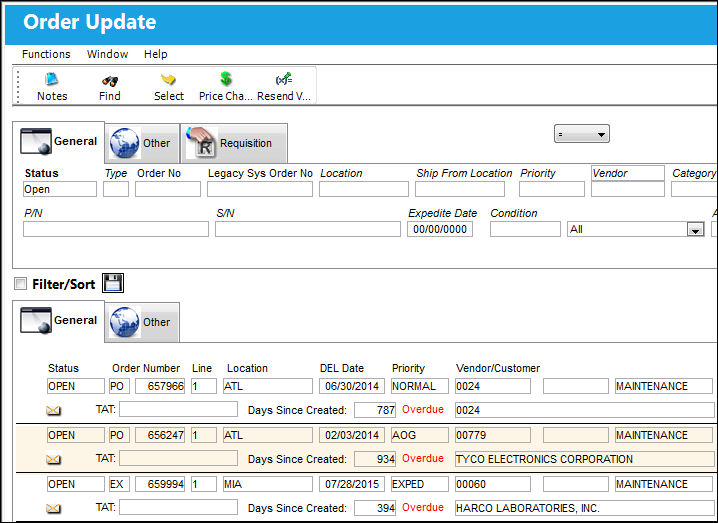
Additional search criteria can be specified in the Order Update, Other Tab and Order Update, Requisition Tab.
Query:
The following information/options are available in this window:
_____________________________________________________________________________________
Status
The current status of the order.
Type
The Type of Order which are as follows:
C/O - Contract Order
E/X - Exchange Order
L/O - Loan Order
M/O - Manufacturer Order
X/O - Exchange Order Out
P/O - Purchase Order
R/N - Rental Order
R/O - Repair Order
S/O - Customer Order (Sales Order)
S/R - Sales Order Return
S/V - Service Order
T/O - Transfer Order
W/C - Warranty Claim Order
Order No.
The type of order and the order number for the transaction.
Legacy System Order Number
The legacy number related to the order. The legacy number is typically identified and used by customers during implementation to cross reference their old systems order number to the new systems order number.
Does not apply to C/O, M/O or W/C order types.
Location
The Location for maintenance events, inventory stores, orders, transactions, or training events.
Ship From Location
Location from which order has been shipped.
Priority
The priority placed on the transaction (e.g., routine, AOG, etc.). For additional information and functionality, refer to the Priority transaction code via the Orders Transaction Codes.
Vendor / Customer
The vendors are defined in the Vendor Master. All vendors must have the required criteria (i.e. supplier, service, etc) to be used against the particular order type. Otherwise, the below message may be received stating that the user will not be able to save the order with that particular vendor.
The customer the order is being placed with requiring the items.
Category
The appropriate category for this transaction. This also works with the Authorization Process as defined against the Order Type.
Company
The company the order is being created for. This field appears only when G/L Interface Switch  COMPANYMULTI is set to 'Yes.' This feature is part of the Multi-Company functionality. Parent company's airlines are entered into this field. Then, when the P/N is entered into the detail window, the G/L field will be auto-populated with this airline's previously created G/L Account. When the switch is set to 'No' the field is titled Category and functions as defined above. For more information see the G/L Interface Switch COMPANYMULTI via the G/L Interface Switches Manual.
Financial Sys Site Code
The order's financial system site code.
P/N
The Part Number reference for the aircraft part.
S/N
The Serial Number for the specific serialized part.
Expedite Date
The accelerated delivery date of this Order; rushed order based part requirement and order priority. Expedite Date may be defaulted as defined in the Order Priority System Tran Code.
Condition
The condition of the part.
Inventory Type drop down
The type of inventory the item is registered as in the system. The available options are All, General, GSE and Maintenance Inventory. All is set as the default.
A/C
The individual aircraft tail number.
Unprocessed Spec2000 Messages checkbox
Select this checkbox to query for Spec2000 orders that have not been processed. For additional information, refer to the S1 Reject Button, via Purchase Order Detail Buttons, of the Orders Training Manual. This checkbox is de-selected by default.
_____________________________________________________________________________________
Results:
The following information/options are available in this window:
_____________________________________________________________________________________
Status
The current status of the order.
Order Type
Type of Order. By order type, certain receiving and financial behaviors will be assigned to the order at receiving of the various Order Types. These order types exist under the Orders or Customer Orders Modules exclusively. All Order Types are Hard Coded into the programming syntax.
Order Number
The type of order and the order number for the transaction.
Line
The specific Line item of the Order. Each Line item could represent a different part included in the same order.
Location
The Location for maintenance events, inventory stores, orders, transactions, or training events.
Priority
The priority placed on the transaction (e.g., routine, AOG, etc.).
DEL Date
The date when the part(s) is/are expected to be received.
QTY ORD
The number of parts for the transaction.
QTY RCVD
The quantity of parts that were received.
Goods Rcvd Batch
The original inventory number assigned to the part or group of parts when initially introduced/received into inventory. This number will remain the same for a part even if/when the part's Batch number changes.
P/N
The Part Number reference for the aircraft part.
P/N Description
The description of the part.
A/C
The individual aircraft tail number.
Vendor
The system code for the service/part provider.
Requisition
List of required parts for either a maintenance item or for restocking.
Days Since Created
The amount of days since the order was created.
_____________________________________________________________________________________
The Notes  and Resend Via Invoice Works
  buttons can be used for additional functionality.
This update window is also available in query mode where users can view the records provided in this window but cannot create new records or edit existing data. Refer to this module's Query menu.
Share
Print
|
©1997-2026 Trax USA Corp. All rights reserved. This manual may not be copied, photocopied, reproduced, translated, or converted to any electronic or machine-readable form, in whole or in part, without prior written approval from Trax USA Corp. |
 |