
 Share
Share
 Print
Print
|
|
|
|
|


Repair Order Creation Queue

The R/O Creation Queue will display a list of part number records that must be sent out for repair. The list of records will match the employees predefined buyer settings in the Employee Master, Buyer Tab.
 The Repair Order Creation Queue is security controlled via Orders/ Update/ R/O Creation Queue. For additional information, refer to the Security Explorer via the System Administration Training Manual.
From this window, the user is able to select a record and place the part number onto a Repair Order.
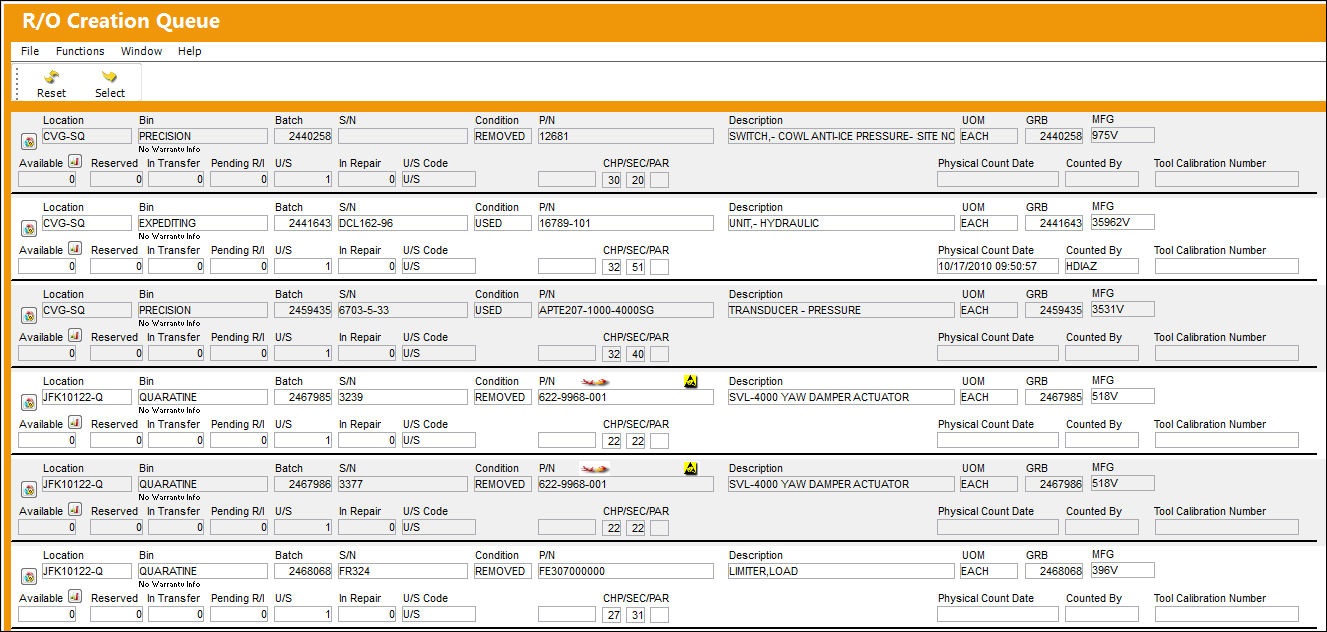
Once the Repair Order is created and completed, the queue will automatically refresh and the P/N will no longer display on the list provided.
The following information/options are available in this window:
_____________________________________________________________________________________
P/N Query Button
Select this button to view the P/N inventory detail information.
Location
The Location for maintenance events, inventory stores, orders, transactions, or training events.
S/N
The Serial Number for the specific serialized part.
Condition
The condition of the part.
Batch
The inventory number that is currently associated with a part or group of parts. A part's Batch number can change after various types of transactions take place.
Owner
The name of the owner of the part, when applicable.
Vendor Lot
Vendor batch number of the part entered upon receiving or initial load, as applicable. This field can contain up to 20 characters.
Cha/Sec/Par
The ATA chapter/section/paragraph, as applicable.
P/N
The Part Number reference for the aircraft part.
UOM
The unit of measure. This will default if associated with a Part Number as defined in the P/N Master. Transactions for parts can be conducted in a different UOM than defined in the P/N Master. However, upon receiving the UOM, conversion will automatically adjust the quantities, providing that the conversion rate is defined in the UOM System Transaction Code (via Setting/Explorer/System Transaction Code).
GRB
The original inventory number assigned to the part or group of parts when initially introduced/received into inventory. This number will remain the same for a part even if/when the part's Batch number changes.
Loan Category
Loan Part Category (short, long, consigned, manage or pool).
Shelf Life EXP
The shelf life expiration date of the part, as applicable.
Tool Life EXP
The tool life expiration date of the part, as applicable.
Physical Count Date
The last date the Physical Count to include the record was generated.
Counted By
The name of the user who generated the last inventory count for the record.
Tool Calibration Number
This is a unique number used to define a tool.
_____________________________________________________________________________________
The P/N Query  and Inventory Level
  buttons can be utilized to view the Inventory Detail and P/N Inventory Level, respectively, as needed for a reference.
Select the Reset  button to refresh the list of P/N records displayed in the Repair Order Creation Queue.
Share
Print
|
©1997-2026 Trax USA Corp. All rights reserved. This manual may not be copied, photocopied, reproduced, translated, or converted to any electronic or machine-readable form, in whole or in part, without prior written approval from Trax USA Corp. |
 |