
 Share
Share
 Print
Print
|
|
|
|
|


Order Authorization
Any order that is created within the system and has been sent for authorization will appear in the Order Authorization window. It is divided into separate categories based on the order types, and expanding any of the menus will reveal all orders of that type that require authorization.
Orders may only be authorized by employees that are part of the department, section and/or division required for the authorization process. These associations can be set up in the Employee Master. When an employee attempts to authorize a record, the system will reference that employee's record in the Employee Master to see if it has the required privileges.
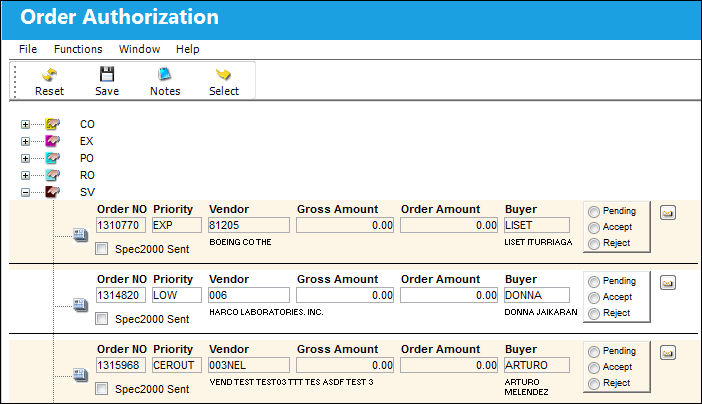
The following information/options are available in this window:
_____________________________________________________________________________________
Order NO
The order number for the transaction.
Priority
The priority placed on the transaction (e.g., routine, AOG, etc.).
Vendor
The system code for the service/part provider.
Gross Amount
The new proposed order total including the pending price change.
Order Amount
The order total before the proposed price change.
Buyer
Individual who issued the order.
Spec2000 Sent checkbox
If selected, the Spec2000 message that corresponds to the order has been sent to the vendor indicated on the order.
Authorization Radio Buttons
The authorization actions that can be performed on the order. Users can accept an order to authorize it, reject it, or set it to pending which will leave the order in the queue.
_____________________________________________________________________________________
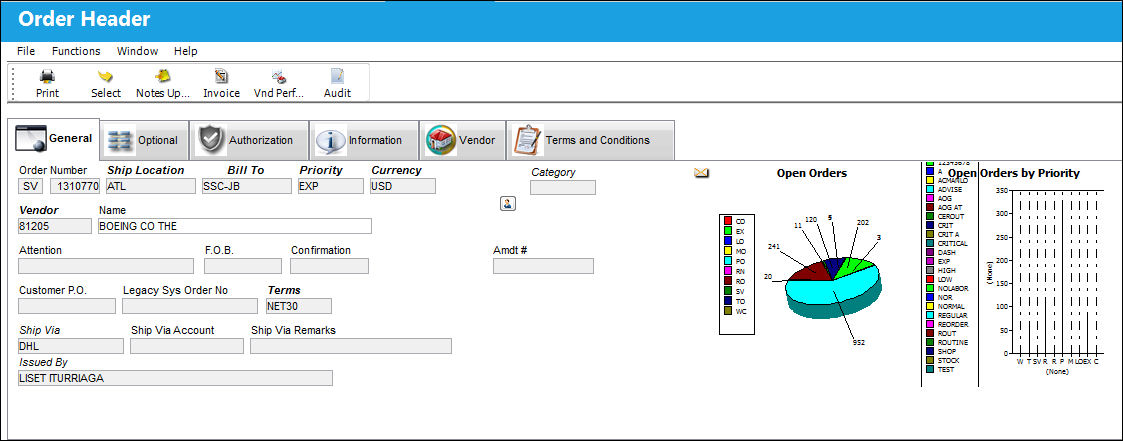
Selecting any of the listed order records will redirect the user to the associated Order Header window, which contains more detailed information about the order in question.
This window is informational-only.
Share
Print
|
©1997-2026 Trax USA Corp. All rights reserved. This manual may not be copied, photocopied, reproduced, translated, or converted to any electronic or machine-readable form, in whole or in part, without prior written approval from Trax USA Corp. |
 |