
 Share
Share
 Print
Print
|
|
|
|
|


Manufacture Order
The Manufacture Order serves as a way to track the fabrication of parts in the company's shops.
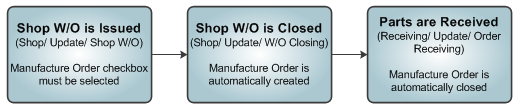
Manufacture Orders are automatically created when a Shop W/O with the Manufacture Order checkbox selected is closed. The following is the basic process for creating and completing a Manufacturing Order:
Manufacture Orders, unlike other order types, are not manually created in the system. There is no New  button in the Manufacture Order window.
Go to Shop/Update/Shop W/O to enter a new Shop W/O.
For additional information regarding the Shop W/O program, refer to Shop W/O via the Shop Training Manual.
Part numbers that are not yet in P/N Master can be entered in the Shop W/O. However, the Part Number needs to be known to the system when the receiving is performed later on.
After the work is performed, close the Shop W/O in Shop/ Update/ W/O Closing.
The Manufacture Order is now automatically created and available in Orders/ Update/ Manufacture Orders.
The following tabs and buttons are available at the header level.
Manufacture Order Header Tabs |
Manufacture Order Header Buttons |
|
Audit Tab (Pre-Version 11) |
Internal Shop Multi buttons
|
 Reset button
 Save button
 Delete button

 Select button
 Invoice button

 W/O Customer Order button
For information on the options in the detail level, refer to Manufacture Order Detail.
Share
Print
|
©1997-2026 Trax USA Corp. All rights reserved. This manual may not be copied, photocopied, reproduced, translated, or converted to any electronic or machine-readable form, in whole or in part, without prior written approval from Trax USA Corp. |
 |