
 Share
Share
 Print
Print
|
|
|
|
|


Inventory Balance Reports
This list contains many functions that can be run monthly. You may choose the function as desired by your particular organization.
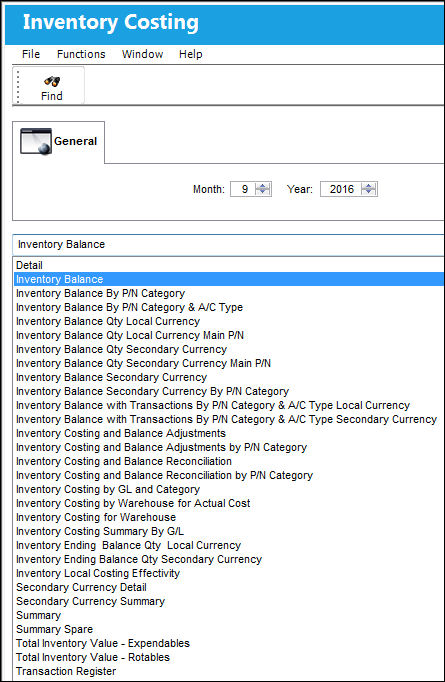
Inventory Balance: The Inventory Balance reports show the value/quantity by part (or category, etc.) as it is derived from the summation of transactions done against that part. For instance, if you receive 10 expendables with an average cost of $5, then a receiving record is written with +50. When you issue out 3 of those parts, an Issue transaction is written of $-15. So the summation of your balance says you have $35 of that part. To run the Inventory Balance, choose Inventory Balance from the drop-down list.
Enter the appropriate Month and Year for which you are running the procedure. Select the Find  button.
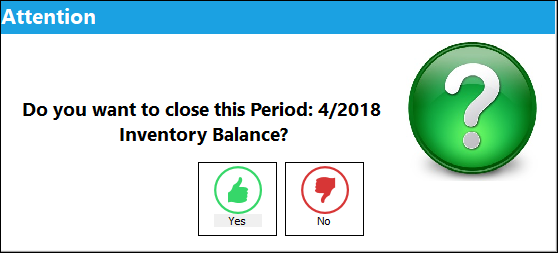
A prompt will ask if the system should close the period. Choose Yes to close the period. Choose No to close the period at some point in the future.
 Note: When G/L switches
  INVCOSTINGBAL and INVCOSTINGADJ are set to Yes, when the Inventory Balance report is generated the above prompt asking 'Do you want to closed this Period...' will not be displayed.
The following Inventory Balance report is generated:
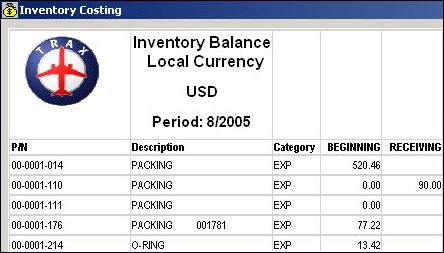
The Inventory Balance Report listing includes the P/N, P/N Description, and P/N Category as well as Beginning and Ending fields that indicate the values of the P/Ns at the beginning and ending of the Balance Period. For details on all of the transactions generated in the Inventory Balance Report, refer to Inventory Balance Report Transactions via the G/L Inventory Training Manual.
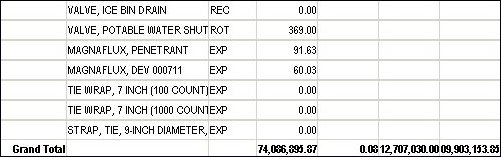
'Grand Total' information appears at the report end (scroll to the end of the report to view).
As an alternative to the inventory monthly parameters, users can organize their inventory closings by periods. This functionality is based on G/L Interface Switch INVBALPERIOD being set to Yes. When set to Yes, the Inventory Costing and Balance prints refer to the pre-determined date Periods created in the Inventory Balance Periods window instead of the months if the year. When set to No, the Inventory Costing and Balance prints refer to the months of the year instead of Periods. For more information refer to Switch INVBALPERIOD via the G/L Planning Switches Manual and the Inventory Balance Periods window via the G/L Interface Training Manual.
Share
Print
|
©1997-2026 Trax USA Corp. All rights reserved. This manual may not be copied, photocopied, reproduced, translated, or converted to any electronic or machine-readable form, in whole or in part, without prior written approval from Trax USA Corp. |
 |