
 Share
Share
 Print
Print
|
|
|
|
|


Inventory Costing (Reconciliation and Adjustment)
These reports compute the "Costing" value of both the monetary value and quantity of each part. Note that this value doesn't come from the summation of the history transactions like the balance values do. Instead, it comes from what you currently have in Inventory at the moment you are running this report. For this reason the report should only be run against the current month. For parts that are tracked with Actual Cost (usually Rotables) the value comes from the Fixed Asset records you have for that P/N. For parts that are tracked via Average Cost (usually expendables) the value comes from the Average Cost field in P/N Master. Reference cost also comes from P/N Master but unlike Average Cost is not re-computed automatically.
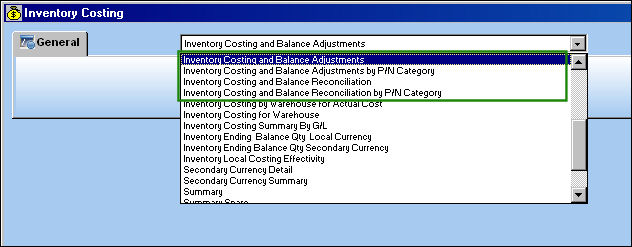
First, select the report you must generate:
TRAX updates the system data and displays for the user a pop-up window summarizing its activities:

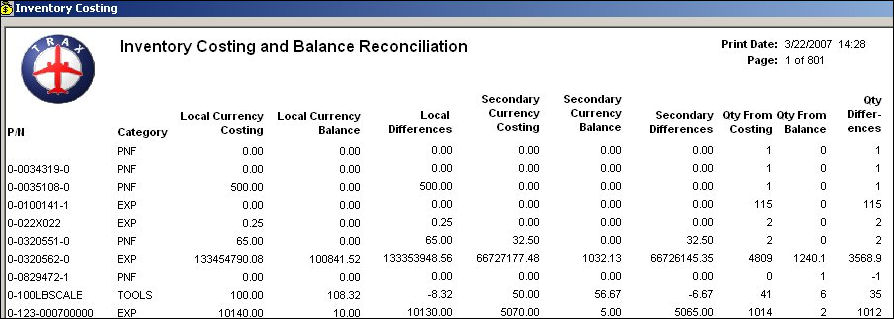
Finally, TRAX displays for the user the generated report:
As an alternative to the inventory monthly parameters, users can organize their inventory closings by periods. This functionality is based on G/L Interface Switch  INVBALPERIOD being set to Yes. When set to Yes, the Inventory Costing and Balance prints refer to the pre-determined date Periods created in the Inventory Balance Periods window instead of the months if the year. When set to No, the Inventory Costing and Balance prints refer to the months of the year instead of Periods. For more information refer to Switch INVBALPERIOD via the G/L Planning Switches Manual and the Inventory Balance Periods window via the G/L Interface Training Manual.
Share
Print
|
©1997-2026 Trax USA Corp. All rights reserved. This manual may not be copied, photocopied, reproduced, translated, or converted to any electronic or machine-readable form, in whole or in part, without prior written approval from Trax USA Corp. |
 |