 Download Online Help
 Print
|
|
|
|
|


The Planning Results window for the Inventory Planner allows planners to query for parts in inventory that are linked to P/N E/Cs and/or P/N Controls.
The Planning Results appear as follows.
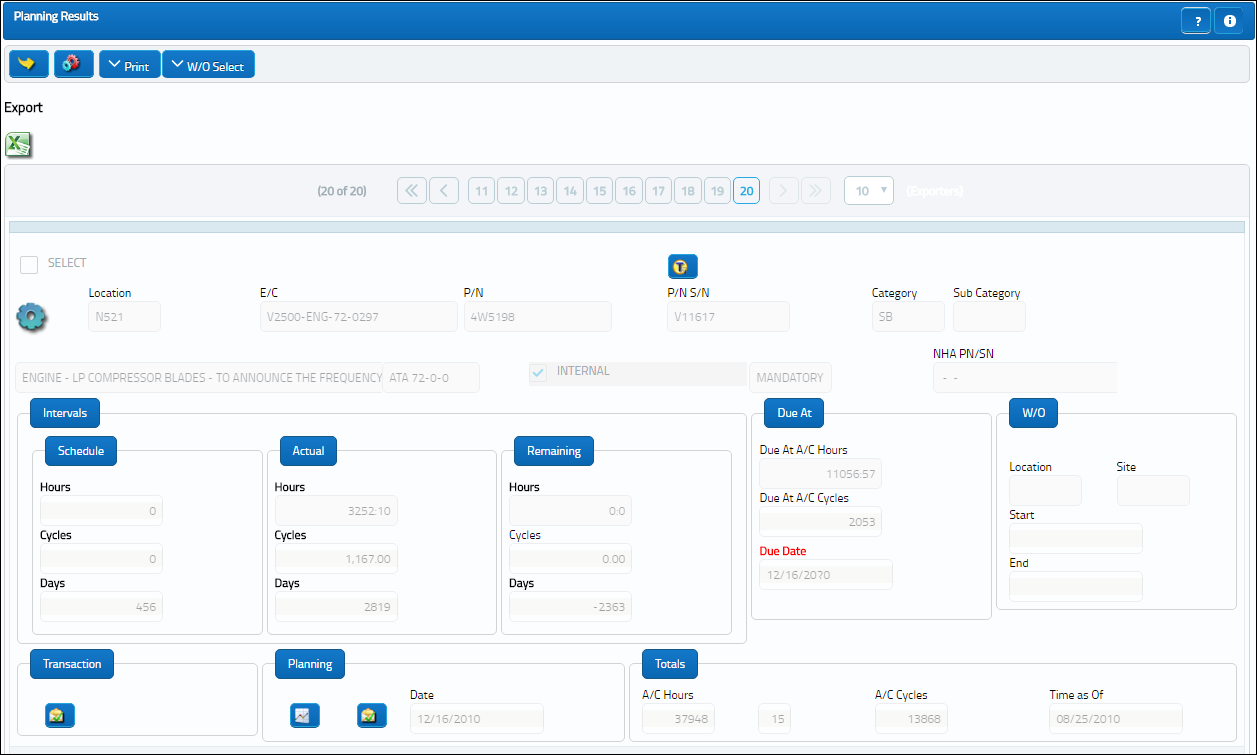
The following options/information is available in this window:
_________________________________________________________________________
Select checkbox
Check the Select Checkbox for items that the user would like to automatically appear on the Work Orders that are created when the Work Order Auto button is used. The Select Checkbox is used with the Work Order Auto  button.
 ALWMULTTSK - When set to Yes, all A/C E/Cs, P/N E/Cs, P/N Controls and Defects will be brought on to a Work Order regardless of how many other Work Orders they are against. When set to No, the A/C E/Cs, P/N E/Cs, P/N Controls and Defects will not be brought on to a Work Order.
- PLNHISTML - When set to Yes, the user can use the Config Number field to determine the limit for the Planning History records. The Config Number field is set to 1 hour. When set to No, the Planning History records will default to 8 hours and the Planning Jobs in the Planning History Tab will remain in the Planning From History tab for 8 hours.
Location
The individual Aircraft tail number.
E/C
The Engineering Control that specifies aircraft or component scheduled maintenance intervals.
P/N
The Part Number reference for the aircraft part.
P/N E/C
This is the Part Number associated to the E/C.
Category
The category of the E/C (i.e. AD, SB, CHECK).
Sub Category
A Sub Category can be used to further define the E/C Category, if applicable. For example, you may want to classify your ADs for Engines, APUs, and Landing Gear separately. The Sub Category Transaction Code is set up via Settings/ Explorer/ System Transaction Code/ Engineering.
Part Status Indicator  button
Select the Part Status Indicator button to display parts available in inventory, on order, or reserved for a particular location (partial/all/none).
Part Status Indicator  button - The green status button displays that all spares required are available in inventory.
Part Status Indicator  button - The yellow status button displays that some, but not all spares are available in inventory.
Part Status Indicator  button - The red status button displays that no spares are available in inventory.
Tool Status Indicator  button
Select the Tool Status Indicator button to display tools available in inventory, on order, or reserved.
Tool Status Indicator  button - The green status button displays that all tools required are available in inventory.
Tool Status Indicator  button - The yellow status button displays that some, but not all tools are available in inventory.
Tool Status Indicator  button - The red status button displays that no tools are available in inventory.
Description
The description is the basic title of the E/C. The number of characters is limited in this field and a longer description can be entered in the E/Cs E/C Content Tab.
Internal checkbox
The internal checkbox is used to determine if work can be done internally. The Internal Capability checkbox will be set to 'On' by default only for those items that a company has the capability to perform internally. The checkbox can be set up through Defect Reports/General Tab,E/C/Other Tab, and P/N Master/P/N Control button.
Mandatory flag
The Mandatory Flag will be displayed for E/Cs that have the Mandatory Classification. For more information refer to the Engineering Control, General Tab via the Engineering - E/C Training Manual.
NHA PN/SN
The Next Highest Assembly for the Serial Number for the specific serialized part.
Schedule (Hours/Cycles/Days)
The Schedule for the item (Hours, Cycles, Days).
Actual (Hours/Cycles/Days)
The Actual time accumulated on the item (Hours, Cycles, Days) from the effective date and/or the last compliance date.
Remaining (Hours/Cycles/Days)
The time remaining against the schedule in hours, cycles or days.
Due At A/C (Hours/Cycles)
The Aircraft Hours/Cycles that the item is due at.
Due Date
The calculated due date of the item (rounded to the nearest date). Planning will calculate the due date based on the number of remaining hours and/or cycles factored by the mean hours set-up for each aircraft
W/O Location
The Location for maintenance events, inventory stores, orders, transactions, or training events.
W/O Site
The site where the work should be carried out (if applicable).
W/O Start Date
The start date of the Work Order
W/O End Date
The end date of the Work Order
Transaction Notification  button
Select the Transaction Notification button to view any notes related to the planning element. The system displays a pop-up window with relevant notes. These transaction notes allow engineering, maintenance programs, and maintenance control to flag information for the planner.
Planning Info  button
Select the Planning Info button to view the A/C Planning Transaction Window. From this pop-up window, the Planned Start Date is defaulted from the Due Date or the date as defined as the Planning Lead Days on the record's Engineering Control, Schedule tab. The user can override this Planned Date as required. For example, if a C-Check is coming due in April, 2017 and an A-Check is scheduled for May, 2017, the user may override the Planned Date to May 2017 to have both the A-Check and C-Check completed. This way, the aircraft is not down twice in two months.
Planned Date
The date maintenance for the aircraft is to take place. The Planned Date is defaulted from the Due Date or the date as defined as the Planning Lead Days om the records Engineering Control, Schedule tab. This date can be overridden as required by selecting the Planning Info button and editing the Planned Start/End Date fields.
Total A/C (Hours/Cycles)
The A/C Totals includes the total number of hours and cycles an aircraft has accumulated by a the last flight log entered.
Time as Of
The date at which the Total A/C (Hours/Cycles) were calculated.
_________________________________________________________________________
Download Online Help
Print
|
©1997-2018 Trax USA Corp. All rights reserved. This manual may not be copied, photocopied, reproduced, translated, or converted to any electronic or machine-readable form, in whole or in part, without prior written approval from Trax USA Corp. |
 |