
 Share
Share
 Print
Print
|
|
|
|
|


Man Hours Schedule Override Detail, General Tab
Select the New  button to create a new record. TRAX displays the following window:
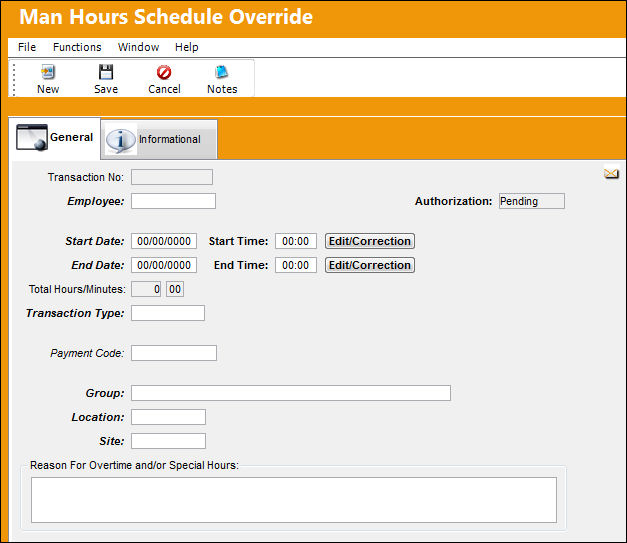
The following information/options are available in this window:
_____________________________________________________________________________________
Transaction No
Based on Configurations, this is the system generated number assigned to the Man Hour Schedule Override record.
 EMPATTSEQ- (Employee Attendance Sign On/Sign Off Next Sequence) - The next sequential number for a Man Hour Schedule Override. Start number is set at implementation. The Config Number field is used.
Employee
The related Employee record for the employee schedule override.
Authorization
The status of the authorization for the override request (accepted, pending, rejected).
Transaction Type
The related Employee Attendance Transaction Type Code.
Only the Employee Attendance Transaction Code with 'Change Schedule' selection will alter the appearance of the Employee's Work Schedule in the Man Hour Schedule Planner.
For additional information, refer to Employee Attendance Transaction Types via the Planning Transaction Code Training Manual.
Payment Code
Allows supervisors to enter a transaction code that determines how a user will be paid for their overtime. Users can then modify this payment method via the Employee Schedule Self-Management window. For detailed information refer to the Override Schedule window via the Employee Schedule Self-Management section of the Planning Training Manual.
Group
The related Group Schedule for the employee schedule override.
Location
The Location for maintenance events, inventory stores, orders, transactions, or training events.
Site
The Site where the work is to be carried out (if applicable). The related maintenance site for the employee schedule override.
Start Date
The related Start Date for the employee schedule override.
Start Time
The related Start Time for the employee schedule override.
Edit\Correction  button
By selecting this button, the user can make changes to the Start Date and Start Time fields. This button is only available once the Override is authorized.
End Date
The related End Date for the employee schedule override.
End Time
The related End Time for the employee schedule override.
Total Hours/ Minutes
The calculated total time (hours/ minutes) for the employee schedule override.
Reason For Overtime and/or Special Hours
The reason for the requested overtime, special hours or time change.
_____________________________________________________________________________________
Share
Print
|
©1997-2026 Trax USA Corp. All rights reserved. This manual may not be copied, photocopied, reproduced, translated, or converted to any electronic or machine-readable form, in whole or in part, without prior written approval from Trax USA Corp. |
 |