
 Share
Share
 Print
Print
|
|
|
|
|


Man Hours Schedule Override
The Man Hour Schedule Override feature is used to modify individual employee schedules; such as time adjustment, hazardous/dirty pay and over-time pay which may then be sent via an interface to a company's Human Resource System.
Employee, Company, Location and Site Vacations are to be recorded in Planning/Update/Vacation Schedule feature.
Go to Planning/Update/Man Hours Schedule Override, the following window will appear. From this window, user may both locate existing records and create new employee schedules override records.
This window is only available when Planning Switch  LBRBYHCNT is set to 'No'. When set to 'No', Man Hour Labor Generation will be determined by Employee and Shift and not by the Head Count functionality. When set to 'Yes', this functionality is not available and the window cannot be accessed. For additional information refer to Switch LBRBYHCNT via the Planning Switches Manual.
To locate an existing record, enter as many of the search criteria as required in the above fields and select the Find  button. Select the Select
  button to view the detail of an existing record.
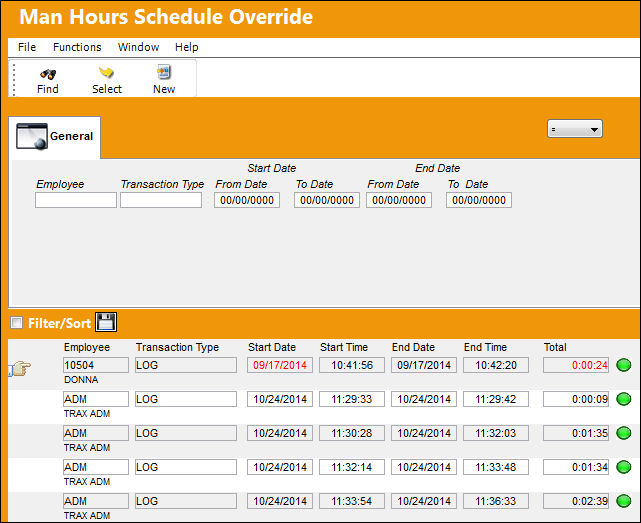
The following information/options are available in this window:
_____________________________________________________________________________________
Employee
The related employee number for the schedule override.
Transaction Type
Type of classification for the schedule changes. These may be defined in planning system transaction codes. For additional information, please refer to the Planning Transaction Codes training manual.
Start Date (From - To)
The Start Date of the schedule change; the start date range for the record search.
End Date (From - To)
The End Date of the schedule change; the end date range for the record search.
_____________________________________________________________________________________
Upon selecting into or creating a record, the Man Hours Schedule Override Detail is available.
Man Hours Schedule Override Detail Tabs |
Man Hours Schedule Override Detail Buttons |
|---|---|
|
Informational Tab Audit Tab |
|
 New button
 Save button
 Cancel button
The changes made here to the employee schedule will be reflected in the Man Hour Schedule Planner via Planning/Query.
Users may create a Man Hour Schedule Override within the Man Hour Schedule Planner via the Planning Query. For additional information, please refer to Man Hour Schedule Planner section of this Training Manual.
This update window is also available in query mode where users can view the records provided in this window but cannot create new records or edit existing data. Refer to this module's Query menu.
Share
Print
|
©1997-2026 Trax USA Corp. All rights reserved. This manual may not be copied, photocopied, reproduced, translated, or converted to any electronic or machine-readable form, in whole or in part, without prior written approval from Trax USA Corp. |
 |