
 Share
Share
 Print
Print
|
|
|
|
|


Man Hours Schedule Planner
The Man Hour Schedule Planner is accessible via the Planning/Query option. Within this window users may view the Work Group, Members of Groups and Schedules as defined in the Man Hour Schedule and Man Hour Schedule Override. Additionally, users may view the employee information, view whether an employee in currently clocked in (via Production/Update/Employee Sign In/ Sign Off), whether the employee labor hours are reserved for a planned maintenance event and, with the proper security access, create Man Hour Schedule Overrides.
The Man Hour Schedule Planner corresponds to the Daily Shifts and Shift Patterns found throughout the Man Hour Schedule functionality. For more information refer to Daily Shift Pattern and Shift Pattern via the Planning Training Manual.
This functionality is only available when Planning Switch  LBRBYHCNT is set to 'No'. When set to 'No', man hour labor generation will be determined by employee and shift and not by the head count functionality. When set to 'Yes', this window is not available and cannot be accessed. For more information refer to Switch LBRBYHCNT via the Planning Switches Manual.
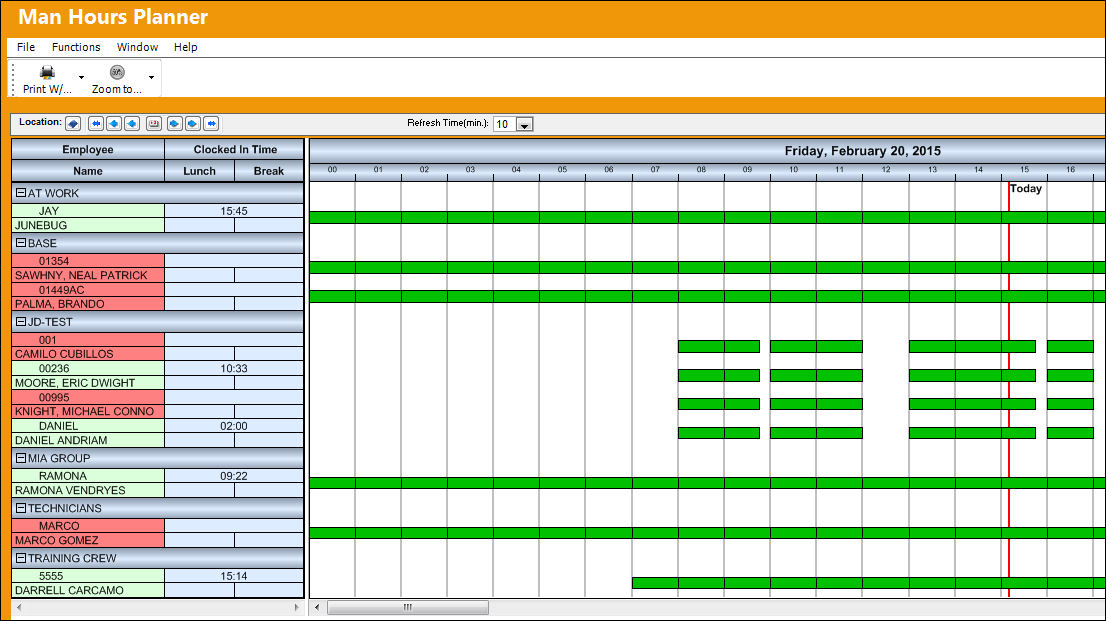
For a breakdown of each of the above sections that make up the Man Hour Schedule Planner, refer to the following links:
Share
Print
|
©1997-2026 Trax USA Corp. All rights reserved. This manual may not be copied, photocopied, reproduced, translated, or converted to any electronic or machine-readable form, in whole or in part, without prior written approval from Trax USA Corp. |
 |