
 Share
Share
 Print
Print
|
|
|
|
|


Employee Information, via Man Hours Planner
The Employee Information portion of the Man Hour Schedule Planner window provides users with information on the selected employee and their work schedule for the selected day. To view this information, select an employee's schedule from the upper-right hand calendar portion of the window. Once selected the Employee Information screen will appear.
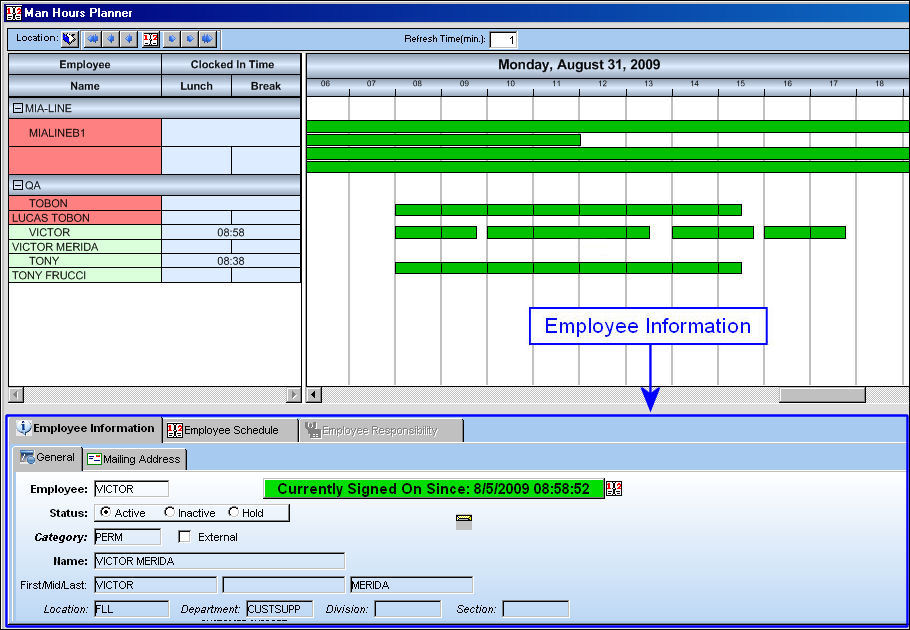
This area contains three tabs: the Employee Schedule tab (where users can view hourly work schedules), the Employee Information tab (where detailed information for the selected employee is available for viewing) and the Employee Responsibility tab (where users can view assigned W/Os, T/C, and N/R T/Cs for the employee selected). For more information refer to the Employee Schedule Tab, the Employee Information Tab, and the Employee Responsibility Tab.
Share
Print
|
©1997-2026 Trax USA Corp. All rights reserved. This manual may not be copied, photocopied, reproduced, translated, or converted to any electronic or machine-readable form, in whole or in part, without prior written approval from Trax USA Corp. |
 |