
 Share
Share
 Print
Print
|
|
|
|
|


The Employee Schedule tab of the Man Hour Schedule Planner allows users to view the man hour schedule for each employee in a group by selecting on the employee's schedule for a given day/date. The Employee Schedule tab appears in the lower portion of the Man Hour Schedule Planner and reveals all available and reserved time for each of the days that the employee is scheduled for work.
Reserved Hours are those hours where employees are assigned to a work package, where as available work schedule are those days and times where the employee is assigned to be on duty but labor has not yet been reserved.
For example, employee 'VICTOR' is scheduled to work on August 31st as indicated above. To view this employee's schedule for a particular date, simply select on the scheduled time for that employee.
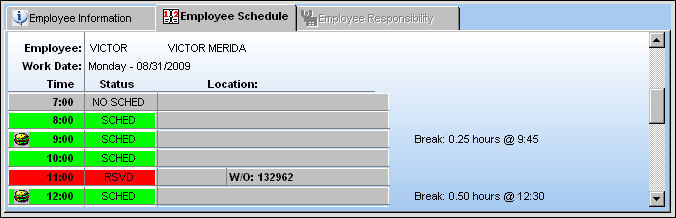
The following information/options are available in this window:
_____________________________________________________________________________________
Employee
The selected Employee's Number and Name.
Work Date
Day of the Week and date of the scheduled work day selected.
Time
The Hours of the day for the date selected.
Status
The Employee schedule status hour for the date selected. The Status are as follows:
NO SCHED  - Employee Unscheduled for Work.
SCHED  - Employee Scheduled for Work with available hours.
RSVD  - Employee Labor Reserved for a Work Order.
The W/O number which the employee's labor is reserved will appear in the Location field.
Location
The Location for maintenance events, inventory stores, orders, transactions, or training events. Location and Site for the Group/ Employee Schedule. This field also displays the Work Order number is the Employee has Labor Reserved for that hour.
Break
Employee schedule breaks as defined in the Daily Shift Pattern via Planning/Update. For additional information, please refer to the Daily Shift Pattern and the Man Hour Schedule sections of the Planning Training Manual.
Break time will be subtracted from available work time and therefore will not reserve employee labor for that period of time. Also, the break time will be noted next to the hour in which it begins in on the Employee Schedule for the record selected.
_____________________________________________________________________________________
Share
Print
|
©1997-2026 Trax USA Corp. All rights reserved. This manual may not be copied, photocopied, reproduced, translated, or converted to any electronic or machine-readable form, in whole or in part, without prior written approval from Trax USA Corp. |
 |