
 Share
Share
 Print
Print
|
|
|
|
|


Aircraft Maintenance Timeline
The Aircraft Maintenance Timeline option displays specific information that is available regarding aircraft and related maintenance timeline.
Select an Aircraft Flight Schedule. Use the cursor to hover over a desired Flight Schedule. A hypertext field appears for that Aircraft Flight Schedule displaying the flight information. The hypertext field will list the ETD (Expected Time of Departure) and ETA (Expected Time of Arrival) for a given flight. This information is taken from the Schedule Depart and Arrival date/times listed for each flight.
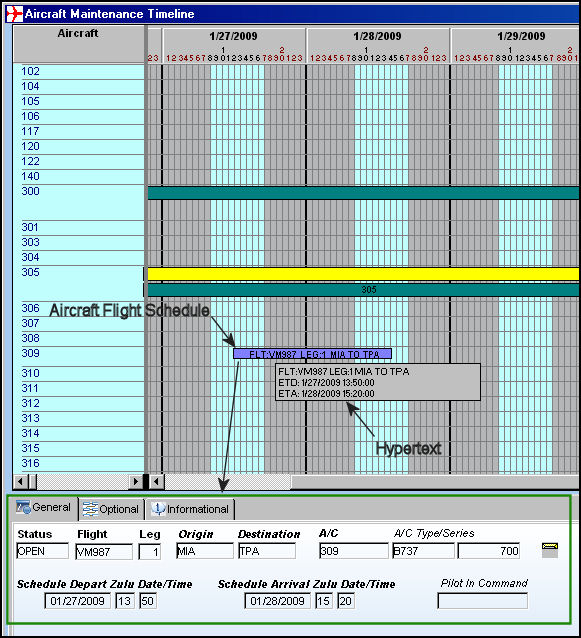
Upon selecting an Aircraft Flight Schedule, the bottom of the window displays the following:
- General Tab
- Optional Tab
- Informational Tab
Select a Work Order. Use the cursor to hover over a desired record. A hypertext field appears for that W/O displaying the W/O number, Location, and Start/Completion dates.
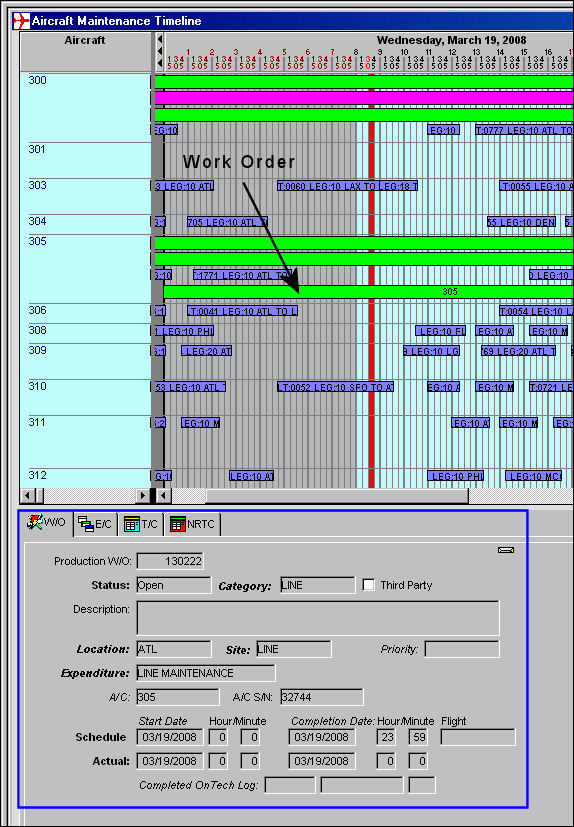
Upon selecting a Work Order, the bottom of the window displays the following:
- W/O Tab
- E/C Tab
- T/C Tab
- NRTC Tab
Additionally, the following buttons are available in this window for more functionality:
- Print Planner button
- Print Screen button
- Zoom to (%) buttons
- 7 / 14 Days buttons
Share
Print
|
©1997-2026 Trax USA Corp. All rights reserved. This manual may not be copied, photocopied, reproduced, translated, or converted to any electronic or machine-readable form, in whole or in part, without prior written approval from Trax USA Corp. |
 |