
 Share
Share
 Print
Print
|
|
|
|
|


Man Hours Schedule Override Query
This query allows the user to view information related to Man Hours Schedule Overrides.
This window is only available when Planning Switch  LBRBYHCNT is set to 'No'. When set to 'No', man hour labor generation will be determined by employee and shift and not by the head count functionality. When set to 'Yes', this functionality is not available and the window cannot be accessed. For more information refer to Switch LBRBYHCNT via the Planning Switches Manual.
TRAX displays the Man Hours Schedule Override Window. The user may query by any of the options in the General Tab. Right click in the Employee field. The Drop Down Selection appears. Select an employee and double click to populate the employee field. Select the Find  button.
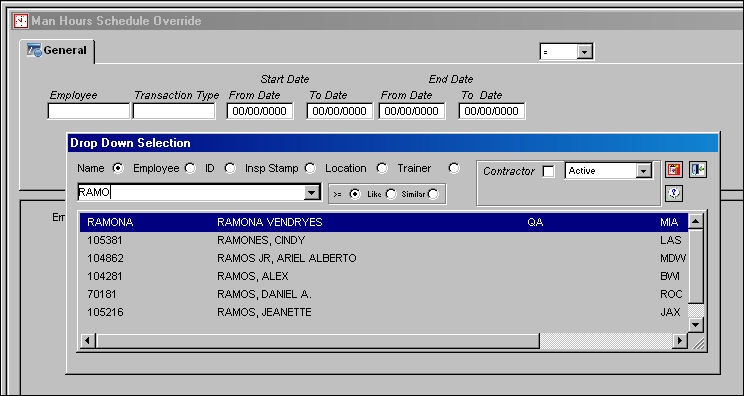
The following information/options are available in this window:
_____________________________________________________________________________________
Employee
Employee code.
Transaction Type
Transaction Type code.
Start Date (From/To)
From and To Start dates.
End Date (From/To)
From and To End dates.
Symbol
Select one of the following symbols to designate the search correctly: equals, greater or less than, greater than or equal to, or like.
_____________________________________________________________________________________
The following query information is found. Select the record to be viewed by placing the Hand  pointer in front of it.
Select the Select  button.
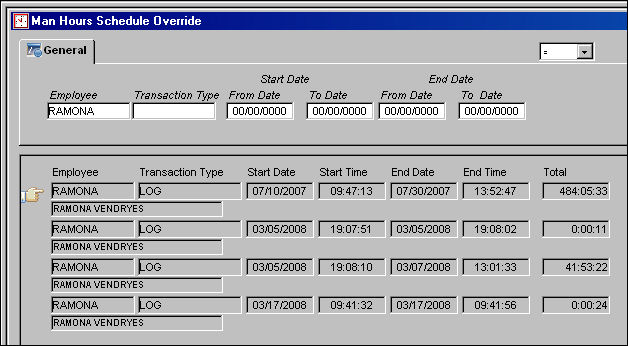
The following query information is available for view:
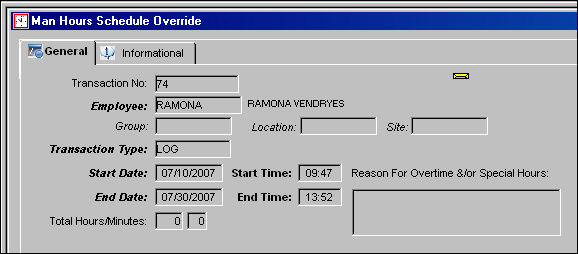
For more information, refer to the Man Hours Schedule Override.
Share
Print
|
©1997-2026 Trax USA Corp. All rights reserved. This manual may not be copied, photocopied, reproduced, translated, or converted to any electronic or machine-readable form, in whole or in part, without prior written approval from Trax USA Corp. |
 |