
 Share
Share
 Print
Print
|
|
|
|
|


7 / 14 Days Buttons, via Aircraft Maintenance Timeline
From the Aircraft Maintenance Timeline window, the timeline information can be displayed in either a seven (7) day format or a fourteen (14) day format. The display options are provided to adjust the view depending on the length (in days) of a maintenance timeline. For a schedule that lasts less than 7 days, it may be best to format the view by using the 7 Days  button:
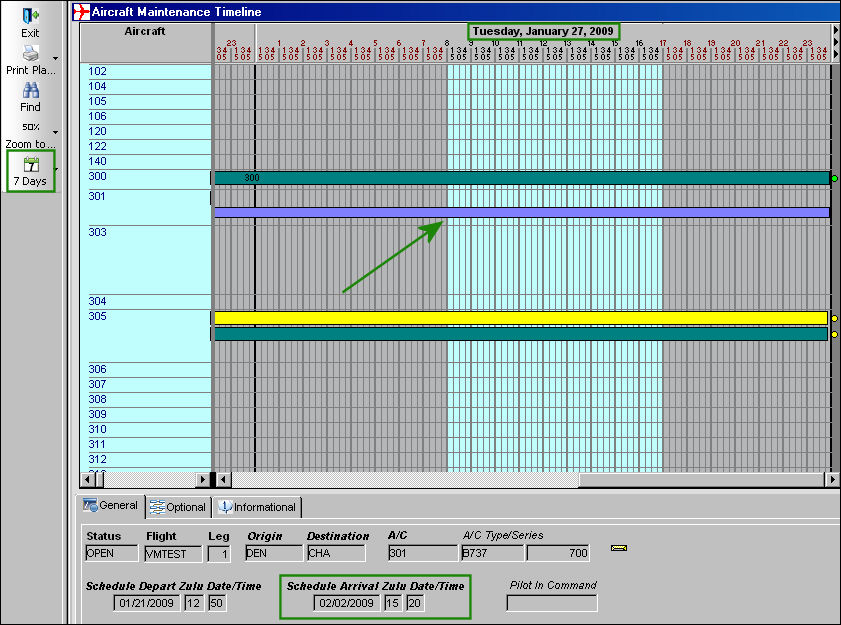
By selecting the 7 Days button, the timeline view will display no more than seven days after the current date.
If a user needs to view a maintenance timeline that exceeds seven days, the 14 Days  button may be a better option. This option will display up to fourteen days after the current date. For example, the above image displays a maintenance timeline that spans over seven days. Notice the Schedule Arrival Zulu Date on the bottom of the image then compare it to the last displayed date on the top right of the window. Because the scheduled arrival date is later than the date at the top, it would be best to use the 14 Days option, as displayed below.
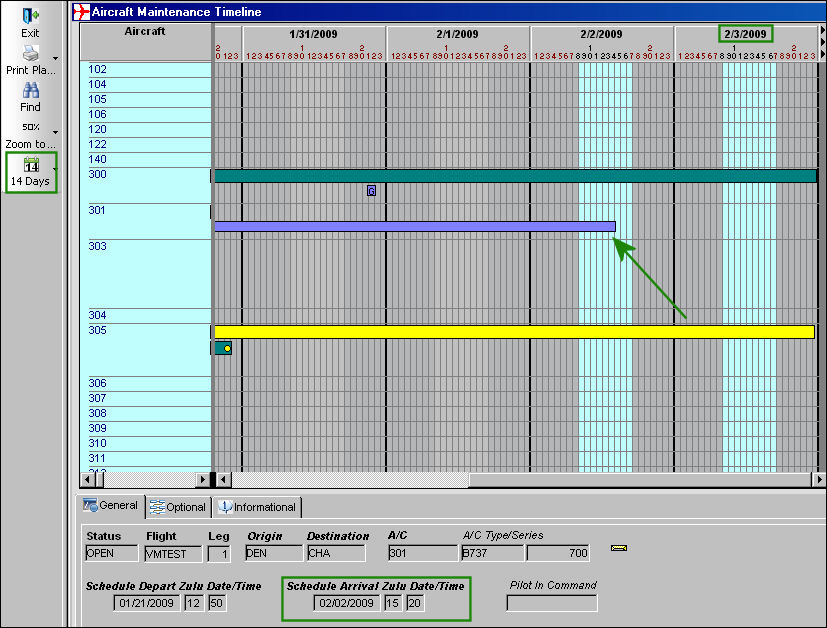
By selecting the 14 Days button, the timeline with the above listed schedule arrival date is fully displayed in the Aircraft Maintenance Timeline window.
Share
Print
|
©1997-2026 Trax USA Corp. All rights reserved. This manual may not be copied, photocopied, reproduced, translated, or converted to any electronic or machine-readable form, in whole or in part, without prior written approval from Trax USA Corp. |
 |