
 Share
Share
 Print
Print
|
|
|
|
|


W/O Task Card Bust Query

The W/O Task Card Bust Query window allows the user to query for W/O Task Card Bust records.
For information regarding Work Orders, refer to the W/O Task Card Bust section via the Production Update Menu which can be found in the Production Training Manual.
 This window is security controlled via Production/ Update/ W/O Task Card Bust Query. For additional information, refer to the Security Explorer of the System Administration Training Manual.
Select from any of the below search criteria to query for a desired Work Order and select the Find  button.
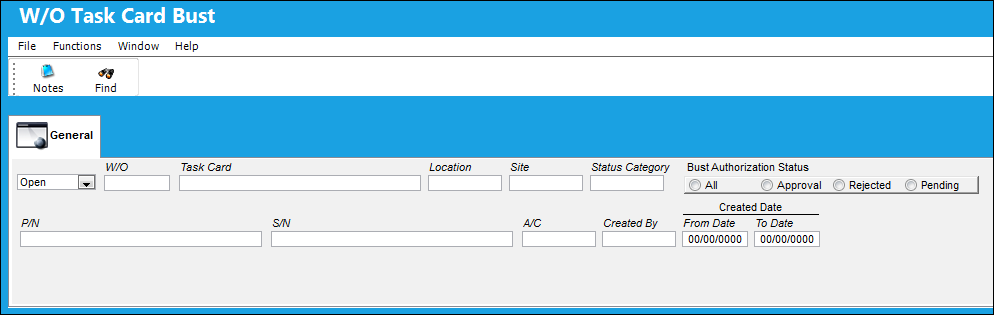
Query
The following information/options are available in this window:
_____________________________________________________________________________________
Status drop down
Select from one of the following two status to query for tasks that are either in 'Open' status or 'Closed' status.
Open - When this bust status is selected, only W/O tasks that are in 'Pre/Auth' status will appear.
Closed - When this bust status is selected, only W/O tasks that are in 'CANCEL' status will appear.
W/O
The Work Order used to categorize, manage, and schedule work requirements for aircraft maintenance.
Task Card
The Task Card / Job Card that details the scheduled maintenance work.
Location
The Location for maintenance events, inventory stores, orders, transactions, or training events.
Site
The Site where the work is to be carried out (if applicable).
Status Category
Provides more information as to why a task was busted (i.e. lack of tools, man power, weather conditions. etc.)
Bust Authorization Status
The authorization status of the Work Order bust record.
All radio button - Select the Pending radio button to query for all Work Order bust records regardless of their status.
Approval radio button - Select the Approval radio button of the status of the Work Order bust record is approved.
Rejected radio button - Select the Pending radio button if the status of the Work Order bust record is rejected.
Pending radio button - Select the Pending radio button if the status of the Work Order bust record is pending.
P/N
The Part Number reference for the aircraft part.
S/N
The Serial Number for the specific serialized part.
A/C
The individual aircraft tail number.
Created By
The user who created the record.
Created Date (From Date-To Date)
The date the record was created.
_____________________________________________________________________________________
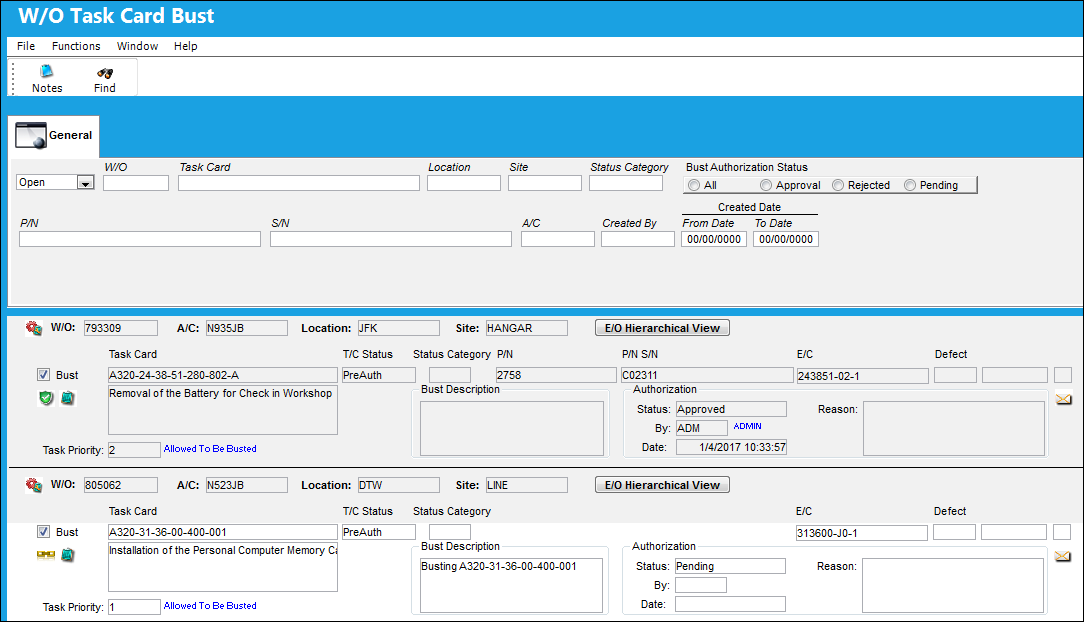
Results:
The following information/options are available in this window:
_____________________________________________________________________________________
W/O
The Work Order used to categorize, manage, and schedule work requirements for aircraft maintenance.
A/C
The individual aircraft tail number.
Location
The Location for maintenance events, inventory stores, orders, transactions, or training events.
Site
The Site where the work is to be carried out (if applicable).
E/O Hierarchical View  button
Select the Hierarchical View button to view all E/Cs, P/N E/Cs and scheduled tasks related to the Work Order.
Bust checkbox
Indicates that the task has been busted.
Release  icon
icon
Indicates that the task has been busted, however it must be authorized.
Rejected  icon
icon
Indicates that the task has been rejected.
Authorized  icon
icon
Indicates that the task has been busted and authorized.
Task Card  icon
icon
Indicates that the scheduled task is for a Task Card.
Non-Routine Task Card  icon
icon
Indicates that the scheduled task is for a Non-Routine Task Card.
Task Card
The Task Card / Job Card that details the scheduled maintenance work.
Task Card Description
The description of the Task Card.
T/C Status
The Status of the Task Card.
Open - The Task Card is in open status and is available for busting.
Pre/Auth - The Task Card has been requested for busting, but is in Pre/Auth status because it must go through the W/O Task Card Bust Authorization process for the bust request to be either 'Accepted' or 'Rejected'.
Canceled - The Task Card bust request has been approved.
Status Category
Provides more information as to why a task was busted (i.e. lack of tools, man power, weather conditions. etc.)
E/C
The E/C reference the Task Card was associated to (if applicable).
Defect
The defect number (or log book number).
Task Priority
The Priority level of the scheduled task. The priority level determines if the task can be busted, or if the task will require authorization. This information will also appear in blue text to the right of the Task Priority field (i.e. Allowed To Be Busted). This is defined via the Task Priority Transaction Code. For additional information, refer to the Production Transaction Code Manual.
Task Priority 1 - Allowed to be busted and canceled automatically.
Task Priority 2 - Allowed to be busted but requires authorization.
Task Priority 3 - Not allowed to be busted.
Bust Description
Enter a description of the Work Order bust.
Note: This field is mandatory.
Authorization Status
The Authorization status of the record.
Authorization By
The user who authorized the record.
Authorization Date
The date the record was authorized.
Authorization Reason
The reason the task bust was authorized. This information is auto populated from the W/O Task Card Bust Authorization window once the task has been authorized.
_____________________________________________________________________________________
Share
Print
|
©1997-2026 Trax USA Corp. All rights reserved. This manual may not be copied, photocopied, reproduced, translated, or converted to any electronic or machine-readable form, in whole or in part, without prior written approval from Trax USA Corp. |
 |