
 Share
Share
 Print
Print
|
|
|
|
|


Employee Attendance Log
The Employee Attendance Log allows shift leads to query for an employee and view/track their daily schedules. The Employee Attendance Log can be printed via the Employee Attendance Log Print option.
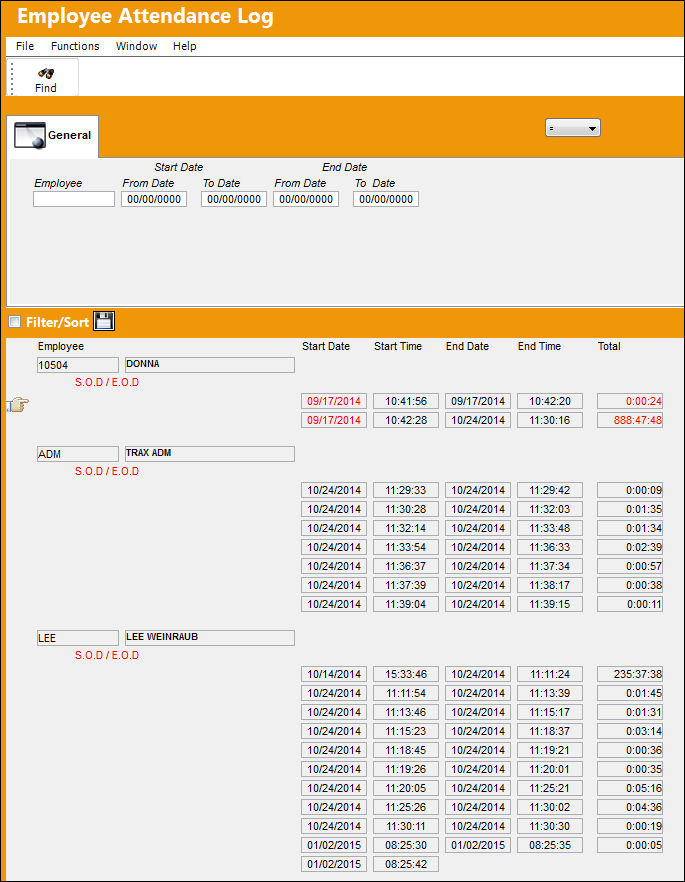
Query:
The following information/options are available in this window:
_____________________________________________________________________________________
Employee
Enter the name or employee number to query for.
Start Date (From -To)
Enter the Start date range of the employee to query by.
End Date (From -To)
Enter the End date range of the employee to query by.
_____________________________________________________________________________________
Results:
The following information/options are available in this window:
_____________________________________________________________________________________
Break  icon
icon
This icon indicates the start/end of breaks and the lunch break.
Start of Day/End of Day
To the right of this icon in the above screen, indicates the Start and End of an employees' daily shift.
Break
This indicates the start and end times of an employees break(s).
Lunch
This indicates the start and end times of an employees lunch.
Transaction Type
The Employee Attendance Transaction Type Code, via Settings/ Explorer/ System Transaction Code/ Planning.
This is a customized request and may not be available to all customers.
_____________________________________________________________________________________
The S.O.D (Start of Day) can be viewed in the Employee Attendance Log as soon as the employee signs in via the Employee Sign-On/Sign-Off.
Share
Print
|
©1997-2026 Trax USA Corp. All rights reserved. This manual may not be copied, photocopied, reproduced, translated, or converted to any electronic or machine-readable form, in whole or in part, without prior written approval from Trax USA Corp. |
 |