
 Share
Share
 Print
Print
|
|
|
|
|


Comat Flights Dashboard, General Tab

Upon selecting the Find  button. The search results appear, as follows:
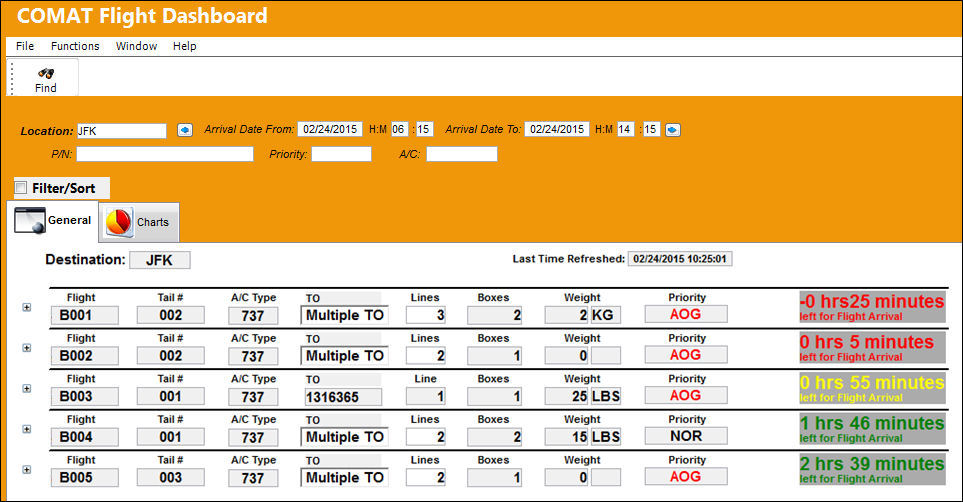
The following information/options are available in this window:
_____________________________________________________________________________________
Destination
The Location of the Arriving Flight(s).
Last Time Refreshed
The last time the search was conducted.
The COMAT Flight Dashboard will automatically refresh depending on the Config Number of Switch  COMATDASHBOARD. If this has not been set, it will default to automatically refresh every two minutes.
Flight
The Flight number arriving.
Tail #
The tail number of the A/C arriving.
A/C Type
The type of A/C arriving.
TO
The T/O number on the Arriving Flight.
If there is more than one T/O cargo on the Arriving Flight, the field will read 'Multiple TO.'
Lines
The amount of lines of the T/O(s).
Boxes
The total amount of boxes being utilized for the T/O(s) on the Arriving Flight.
Weight
The total weight of the T/O cargo.
Priority
The priority of the T/O.
Arrival Time
The time remaining until the Flight Arrives, or since the Flight Arrived.
Expand  button
Select this button for each Arriving Flight to display the T/O information available.
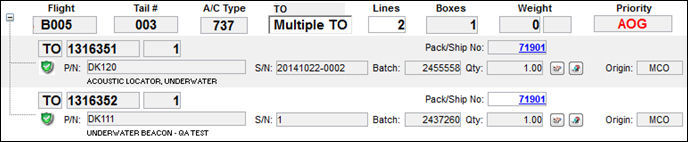
From the T/O information, the Pack/Ship No. can be selected to open the Packing and Shipping record to query.
_____________________________________________________________________________________
Share
Print
|
©1997-2026 Trax USA Corp. All rights reserved. This manual may not be copied, photocopied, reproduced, translated, or converted to any electronic or machine-readable form, in whole or in part, without prior written approval from Trax USA Corp. |
 |