
 Share
Share
 Print
Print
|
|
|
|
|


Comat Flights Dashboard

The Comat Flights Dashboard is a customer-specific window that shows arriving flights, by Location, containing T/O cargo for personnel to receive necessary items.
 This button is security controlled via Receiving/Update/Comat Flights Dashboard. For more information refer to the Security Explorer via the System Administration Training Manual.
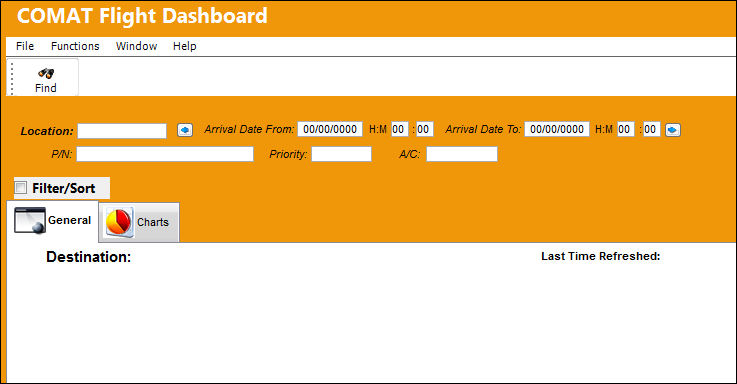
The following information/options are available in this window:
_____________________________________________________________________________________
Location
The Location for maintenance events, inventory stores, orders, transactions, or training events. The Location of the Arriving Flights.
-1 Hour  button
Select this button to subtract one hour from the Arrival Date From time being searched.
Arrival Date From
Starting date from which the Arriving Flights will be tracked for T/O cargo.
Hours/Minutes
Starting time from which the Arriving Flights will be tracked for T/O cargo.
Arrival Date To
Ending date to which the Arriving Flights will be tracked for T/O cargo
Hours/Minutes
Ending time to which the Arriving Flights will be tracked for T/O cargo.
+1 Hour  button
Select this button to add one hour to the Arrival Date To time being searched.
P/N
The Part Number reference for the aircraft part. The specific part of any T/Os of Arriving Flights.
Priority
The priority of the T/O.
A/C
The individual aircraft tail number.
_____________________________________________________________________________________
After populating the necessary search criteria and selecting the Find  button, results can be found in the following tabs:
Share
Print
|
©1997-2026 Trax USA Corp. All rights reserved. This manual may not be copied, photocopied, reproduced, translated, or converted to any electronic or machine-readable form, in whole or in part, without prior written approval from Trax USA Corp. |
 |