
 Share
Share
 Print
Print
|
|
|
|
|


The Shop W/O Non-Routine Task Card, Work Accomplished tab allows the user to enter/update work accomplished information related to a Non-Routine Task Card. This window is accessed from the Shop Work Order Detail window via the Non-Routine Task Card  button.
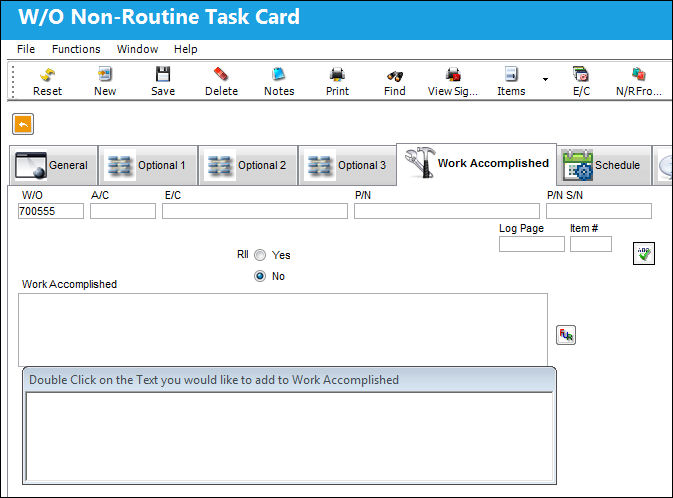
The following information/options are available in this window:
_____________________________________________________________________________________
W/O
The Work Order used to categorize, manage, and schedule work requirements for aircraft maintenance.
A/C
The individual aircraft tail number.
E/C
The Engineering Control that specifies aircraft or component scheduled maintenance intervals.
P/N
The Part Number reference for the aircraft part.
P/N S/N
The Serial Number for the specific serialized part.
Log Page / Item #
The aircraft log in which the troubleshooting item is copied from. This field would be used if a company doesn't employ the MDDR function. These fields only appear in this window when a Defect Report with these fields is attached to the W/O. This will only take place when the specific Defect Type Transaction Code has the Link Log page and Item in N/R to Troubleshooting checkbox selected. For more information refer to the Defect Type via the Technical Records Transaction Code Manual.
RII checkbox
Required Inspection Item. Select this checkbox if the item requires inspection. This is informational only.
Spell Check  Button
Checks the spelling of the text entered in the Work Accomplished field.
Work Accomplished
The actual work that was accomplished against the Shop W/O Task Card / Non-Routine Task Card.
_____________________________________________________________________________________
Share
Print
|
©1997-2026 Trax USA Corp. All rights reserved. This manual may not be copied, photocopied, reproduced, translated, or converted to any electronic or machine-readable form, in whole or in part, without prior written approval from Trax USA Corp. |
 |