
 Share
Share
 Print
Print
|
|
|
|
|


The Shop W/O (N/R) Task Card Item, TraxDoc References tab allows the user to view the following information regarding the TraxDoc reference. The user may also add and delete records from this window.
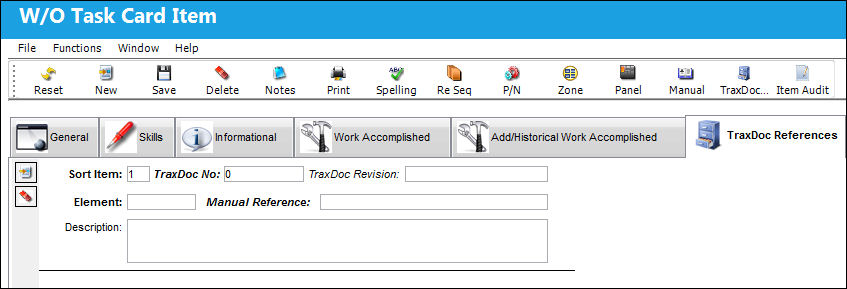
The following information/options are available in this window:
_____________________________________________________________________________________
Sort Item
The Task Card item number.
TraxDoc No.
Enter the TraxDoc number. This is a record number that is automatically generated within TraxDoc.
TraxDoc Revision
The document’s current revision number. Each TraxDoc can have multiple revisions as the data/records created through the TraxDoc will need to be updated (revised) regularly depending on the requirements of the aircraft manufacturer, regulatory agency, airline, etc.
Element
The type of record being referenced.
Manual Reference
A reference to a specific section of the SGML manual that was imported through the TraxDoc. Select into the Manual Reference field for the References Search. For information regarding the function of this window, refer to the Create Items From Reference Button, Via the Items Button which can be found in the Engineering - T/C Training manual.
Description
The description of the TraxDoc item reference.
_____________________________________________________________________________________
Select the New  button to add a new item to the Task Card. The user may add another item to the Task Card as shown below.
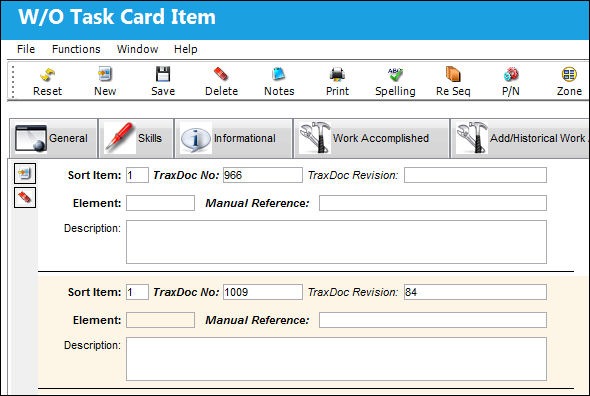
Select the Delete  button to delete a record.
Share
Print
|
©1997-2026 Trax USA Corp. All rights reserved. This manual may not be copied, photocopied, reproduced, translated, or converted to any electronic or machine-readable form, in whole or in part, without prior written approval from Trax USA Corp. |
 |