
 Share
Share
 Print
Print
|
|
|
|
|


Select the Zone  button to enter the specific work zones for the Task Card. Zones can be validated against the data in the Task Card Control Master. Set Task Card Control Master Edit switch to Yes. Go to Engineering/Update/Task Card Control Master.
Please note Switch  TC/CTL - (Task Card Control Master Edit) - If set to Yes, the system will verify that the panels and zones that are associated with Task Cards exist via Engineering/Update/Task Card Control Master.
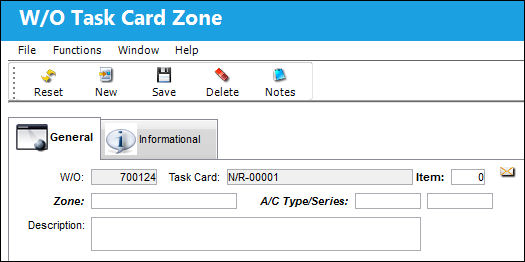
The following information/options are available in this window:
_____________________________________________________________________________________
Task Card
The Task Card / Job Card that details the scheduled maintenance work.
Item (0 = ALL)
The specific item number on the Task Card that this record is to be associated with. Leave default '0' to have this record associated with all item numbers on the Task Card.
Zone
The Zone area for the Task Card (selected from Task Card Control Master).
Description
The Zone description for the Task Card.
_____________________________________________________________________________________
Additional information can be viewed through the Shop W/O (N/R) Task Card Zone, Informational tab, and added through the Notes  button.
Applicable zones can be imported to a Task Card using the MPT Loader function. For more information, refer to the Zone MPD Import.
Share
Print
|
©1997-2026 Trax USA Corp. All rights reserved. This manual may not be copied, photocopied, reproduced, translated, or converted to any electronic or machine-readable form, in whole or in part, without prior written approval from Trax USA Corp. |
 |