
 Share
Share
 Print
Print
|
|
|
|
|


The ISE Communications  button allows the user to distinguish specific information that is to be associated to a Shop Work Order Non-Routine Task Card, along with the individual Employee responsible for this information and any supporting documents that may be relevant. Multiple records of information can be associated to the N/R T/C with varying necessary Priority of it being required.
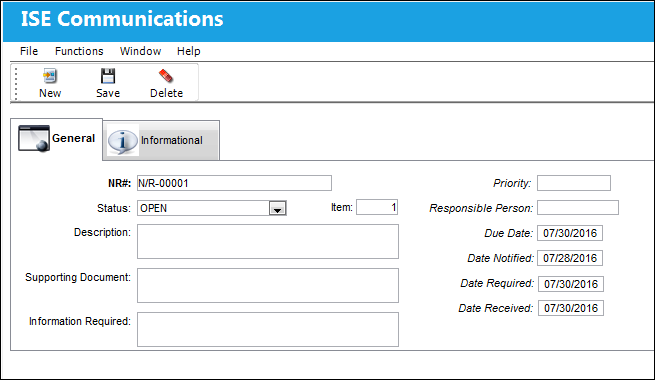
The following information/options are available in this window:
_____________________________________________________________________________________
NR#
The Non-Routine Task Card that details non-scheduled maintenance work / findings.
Status
The Status of the ISE Communication record, set through the N/R Engineering Status System Transaction Code.
Item
The line item of the ISE Communications information for the W/O Non-Routine Task Card.
Description
A description of the ISE Communication information being associated to the W/O Non-Routine Task Card.
Supporting Document
Any document(s) relevant/necessary for the record.
Information Required
Additional information necessary to be included.
Priority
The priority of the record, set through the Priority System Transaction Code.
Responsible Person
Employee responsible for the ISE Communication information, taken from the Employee Master.
Due Date
The date that the information is due for the W/O Non-Routine Task Card.
Date Notified
The date that the Responsible Person has been notified of the record for the W/O Non-Routine Task Card.
Date Required
The date that the ISE Communication information is needed.
Date Received
The date that the ISE Communication information has been received.
_____________________________________________________________________________________
Additional information can be viewed in the ISE Communications, Informational Tab.
Share
Print
|
©1997-2026 Trax USA Corp. All rights reserved. This manual may not be copied, photocopied, reproduced, translated, or converted to any electronic or machine-readable form, in whole or in part, without prior written approval from Trax USA Corp. |
 |