
 Share
Share
 Print
Print
|
|
|
|
|


When an E/C is linked to a Shop W/O, thus creating a Shop W/O T/C, the Status and Function of the E/C can be changed due to the Status of the Shop W/O Task Card being changed. However, compliance of the E/C is still dependent on the closing of the Shop Work Order as a whole, unless the Daily checkbox is selected in the Shop W/O Engineering Control window.
The change of the Shop Work Order Task Card only takes effect on the E/C when the change is conducted on the last Task Card of the E/C.
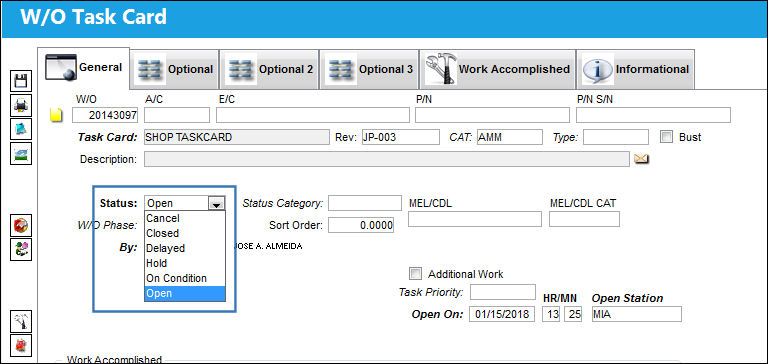
The Status of the Task Card is changed during the work, as seen in the Shop W/O Task Card window, opened by selecting the Task Card after selecting the T/C Work  button, seen below:
In turn, changing the Status of the Shop W/O Task Card can have an effect on the Status and Function of the W/O E/C, which can be seen below:
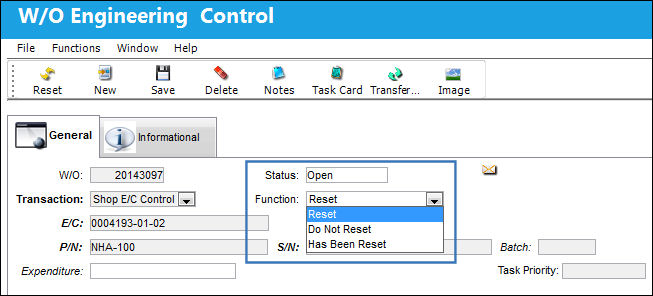
Changing the W/O Task Cards to specified Statuses has the following effects:
W/O Task Card Status |
E/C Status |
E/C Function |
Cancel |
Open |
Upon changing the W/O Task Card Status to Cancel, a prompt asks the user to change the Function of the E/C to Do Not Reset. Selecting 'Yes' changes the Function to Do Not Reset and selecting 'No' keeps the Function to Reset. |
Closed |
Closed |
Reset |
Delayed |
Closed |
Reset |
Hold |
Open |
Reset |
On Condition |
Closed |
Reset |
When transferring the Task Card to a different Shop Work Order, the Status and the Function of the E/C remain the same on the new Shop Work Order. For more information, refer to the Transfer E/C  button, via Shop W/O Engineering Control.
Share
Print
|
©1997-2026 Trax USA Corp. All rights reserved. This manual may not be copied, photocopied, reproduced, translated, or converted to any electronic or machine-readable form, in whole or in part, without prior written approval from Trax USA Corp. |
 |