 Download Online Help
 Print
|
|
|
|
|


A/C Installed Parts Query
The A/C Installed Parts Query allows the user to query for parts that have been installed in an aircraft.
As with the majority of the query selections on the system, it is better to select as many parameters as required to minimize the search result.
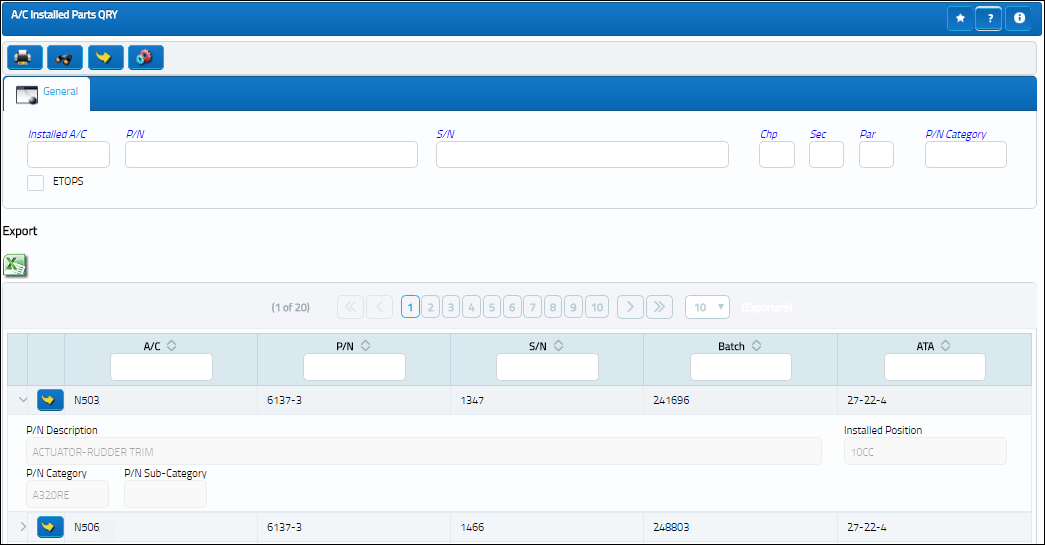
Query
The following options/information is available in this window:
_________________________________________________________________________
A/C
The individual Aircraft tail number.
P/N
The Part Number reference for the aircraft part.
S/N
The Aircraft's Serial Number which is provided by the manufacturer. This serial number is like a registration number, but it is not dependent on a country code and therefore never changes.
Chp/Sec/Par
The ATA chapter/section/paragraph, as applicable.
P/N Category
The category of the part as defined in Settings/ Explorer/ System Transaction Code Explorer/ Settings/ P/N Category (e.g. Rotable, Consumable, Repairable) and entered for the particular part in the P/N Master.
A/C Type Series
The aircraft Type and Series / Fleet assignment.
ETOPS checkbox
Select this checkbox if the aircraft is an ETOPS rated aircraft.
_________________________________________________________________________
Results
The following options/information is available in this window:
_________________________________________________________________________
A/C
The individual Aircraft tail number.
P/N
The Part Number reference for the aircraft part.
S/N
The Aircraft's Serial Number which is provided by the manufacturer. This serial number is like a registration number, but it is not dependent on a country code and therefore never changes.
Batch
The batch number that is associated with a part when introduced/received into the system.
ATA
The ATA chapter/section/paragraph, as applicable.
Installed Position
The position on the aircraft of the installed part.
P/N Category
The category of the part as defined in Settings/ Explorer/ System Transaction Code Explorer/ Settings/ P/N Category (e.g. Rotable, Consumable, Repairable) and entered for the particular part in the P/N Master.
P/N Sub-Category
The Sub Category for each part.
_________________________________________________________________________
Download Online Help
Print
|
©1997-2018 Trax USA Corp. All rights reserved. This manual may not be copied, photocopied, reproduced, translated, or converted to any electronic or machine-readable form, in whole or in part, without prior written approval from Trax USA Corp. |
 |