 Download Online Help
 Print
|
|
|
|
|


Dent Mapping Query
The Dent Mapping Query allows users to query for any aircraft that have physically marked dents on images of the aircraft where one or more defects have been identified. Similar to any of the query windows in TRAX, when more search parameters are entered, the system will return more specific results.
Note: This window is security controlled via Technical Records/ Query/ Dent Mapping Query. For additional information, refer to the Security Explorer via the System Administration Training Manual.
Go to Technical Records/ Update/ Dent Mapping Query.
TRAX displays the Dent Map window.
Enter any desired search criteria and select the Find  button. In the following example, the user has elected to search by aircraft.
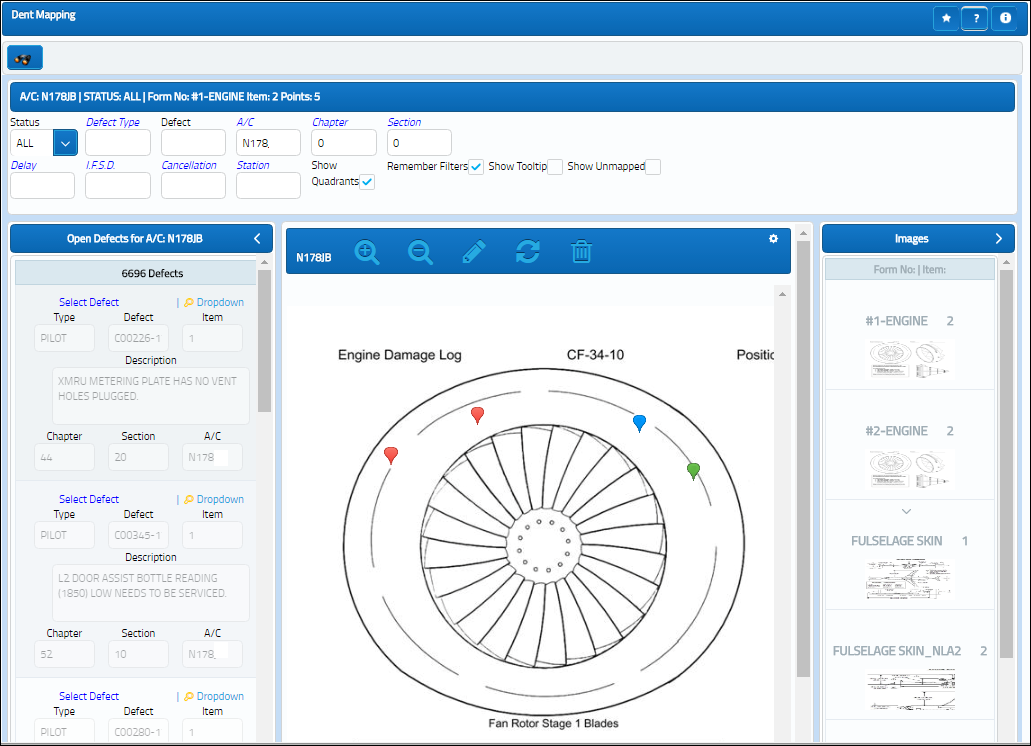
The following options/information is available in this window:
_________________________________________________________________________
Status
The status of the defect.
Defect type
The type of defect found on the aircraft (for example, Pilot Report, MX Report). For additional information, refer to the Defect Type Transaction Code, via the Technical Records Transaction Code Manual.
Defect
The defect number (or log book number).
A/C
The individual Aircraft tail number.
Chapter/Section
The ATA Chapter/Section classification of the Defect. The Chapter/Section information must be setup against the Intelli Forms button. If no Chapter/Section is setup against the aircraft, the query will return images for all Chapter/Sections of the aircraft. For additional information, refer to the Intelli Forms Button, via A/C Type/Series of the Settings Training Manual.
Delay
The Delay Code (i.e. Equipment Failure, Scheduled Ground Time). For additional information, refer to the Delay Transaction Code, via the Technical Records Transaction Code Manual.
I.F.S.D
The Engine In-Flight Shut Down code (i.e. Foreign Object Debris, Lightening Strike). These codes can be set up via the Technical Records Transaction Codes. Go to Settings/ Explorer/ System Transaction Code/ Technical Records.
Cancellation
The flight cancellation code if applicable (i.e. Maintenance Repairs, Ground Servicing). These codes can be set up via the Technical Records Transaction Codes. Go to Settings/ Explorer/ System Transaction Code/ Technical Records.
Station
The station where the defect was worked on.
Show Quadrants checkbox
Select the Show Quadrants checkbox to display the four quadrants of an image.
Remember Filters checkbox
Select the Remember Filters checkbox to have the system remember and display the filters specified by the user when they exit and enter the Dent Mapping window.
Show Tooltip checkbox
Select the Show Tooltip checkbox to view additional details regarding the defect when the user hovers over each mark illustrated on the image.
Show Unmapped checkbox
Select the Unmapped Defect Only checkbox to display only defects that have not yet been mapped on the image.
_________________________________________________________________________
Download Online Help
Print
|
©1997-2018 Trax USA Corp. All rights reserved. This manual may not be copied, photocopied, reproduced, translated, or converted to any electronic or machine-readable form, in whole or in part, without prior written approval from Trax USA Corp. |
 |