 Download Online Help
 Print
|
|
|
|
|


A/C Log Book Master Query
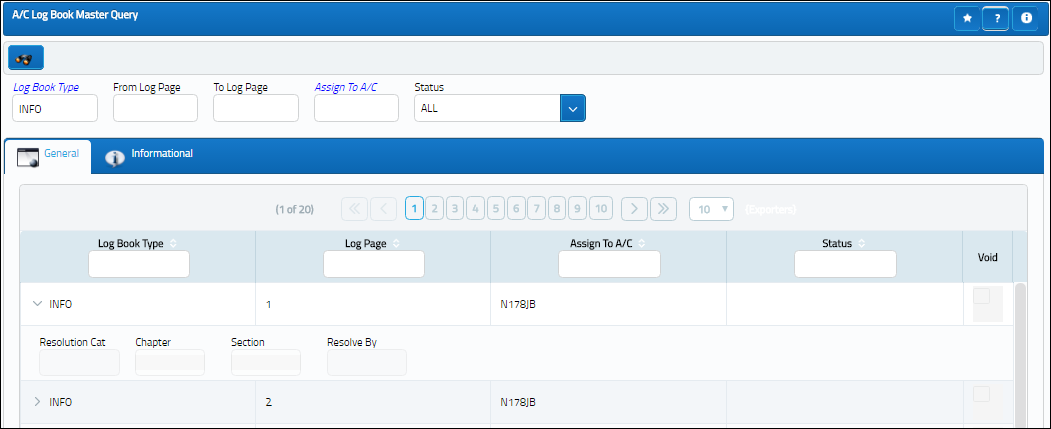
The A/C Log Book Master Query allows the user to search for Log Books.
As with the majority of the query selections on the system, it is better to select as many parameters as required to minimize the search result.
Query
The following options/information is available in this window:
_________________________________________________________________________
Log Book Type
Select a Log Book type.
From Log Page
Enter a start page number.
To Log Page
Enter a last page number.
Assign To A/C
Assign this log to a particular aircraft.
Status
The status of the Log Book (i.e ALL, Open, Closed).
_________________________________________________________________________
Results
The following options/information is available in this window:
_________________________________________________________________________
General Tab
Log Book Type - Select a Log Book type.
Log Page - The aircraft log in which the troubleshooting item is copied from. This field would be used if a company doesn't employ the MDDR function.
Assign To A/C - Assign this log to a particular aircraft.
Status - The status of the Log Book (i.e ALL, Open, Closed).
Resolution Cat - The Resolution category. Select into this field to access a drop down window of pre-defined Resolution Category codes.
Chap/Sec - The ATA Chapter/Section classification of the Defect.
Resolve By - The employee who resolved the defect.
Void checkbox - This checkbox identifies which log pages have been voided because they have been damaged and/or lost. The checkbox is only available if there is a Defect Report matching the log page. For example, notice log page '5' above does not have the Void checkbox available. This log page can be searched for in the Defect Report window.
Informational Tab
Created By - The user who created the record.
Created Date - The date the record was created.
Modified By - The user who last modified the record.
Modified Date - The date the record was last modified.
_________________________________________________________________________
Download Online Help
Print
|
©1997-2018 Trax USA Corp. All rights reserved. This manual may not be copied, photocopied, reproduced, translated, or converted to any electronic or machine-readable form, in whole or in part, without prior written approval from Trax USA Corp. |
 |