
 Share
Share
 Print
Print
|
|
|
|
|


T/C Work Button, via W/O Post Completion
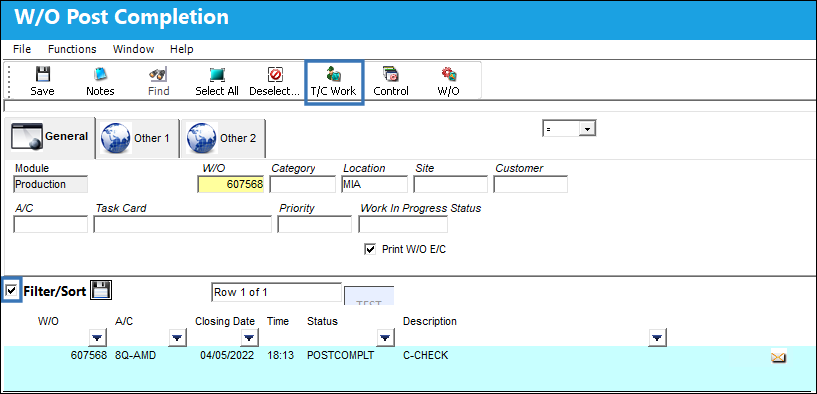
The Task Card Work  button provides convenient access to the Task Card update window for Work Orders with a Post Completion status.
Select the checkbox adjacent the desired record. Then select the T/C Work button to access the Task Card Work window.
The W/O Task Card Work window provides convenient access to review and update task card work details prior to closing the Work Order.
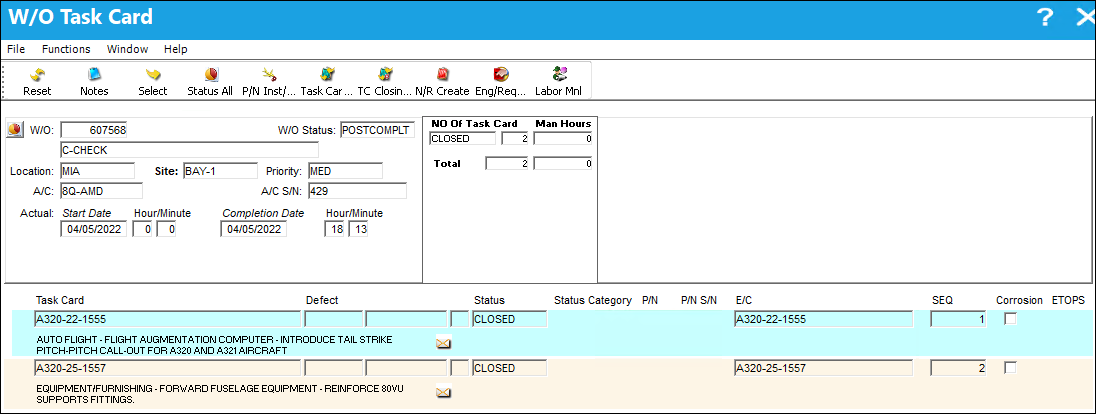
Additional buttons allow the user to review and update the status of Task Cards, non-routine maintenance records, scheduling, Engineering Requests, and the installation, removal, and return of unused parts. Labor details may also be updated where required before the record is closed.
For more information regarding related fields, available buttons, and functionality, refer to Task Card Work Button, via Work Order.
Share
Print
|
©1997-2026 Trax USA Corp. All rights reserved. This manual may not be copied, photocopied, reproduced, translated, or converted to any electronic or machine-readable form, in whole or in part, without prior written approval from Trax USA Corp. |
 |