 Download Online Help
 Print
|
|
|
|
|


Resources Tab
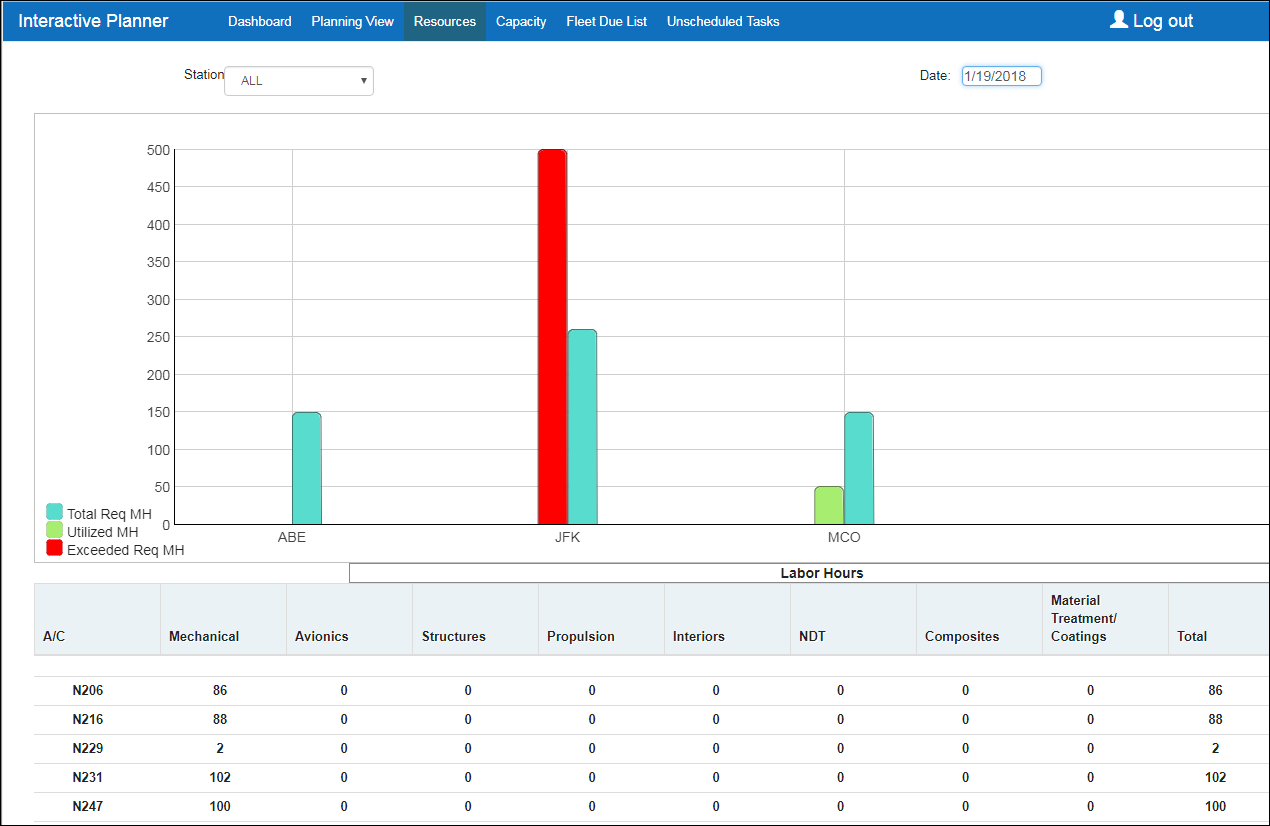
The Resources tab shows the amount of employees available at each applicable Location, and the employee skills available for each aircraft. This tab is only informational.
- In the top of the window, select the Station(s) (ALL are selected by default) and the Date.
- At the bottom of the window, the required Skill Categories are listed for each aircraft related to the selected station(s) and date filters.
The following graph displays the total required man hours in turquoise, as well as the utilized man hours in green. If the resources or man hours used exceeds the total required man hours, the utilized man hours bar graph will change from green to red.
Download Online Help
Print
|
©1997-2018 Trax USA Corp. All rights reserved. This manual may not be copied, photocopied, reproduced, translated, or converted to any electronic or machine-readable form, in whole or in part, without prior written approval from Trax USA Corp. |
 |