 Download Online Help
 Print
|
|
|
|
|


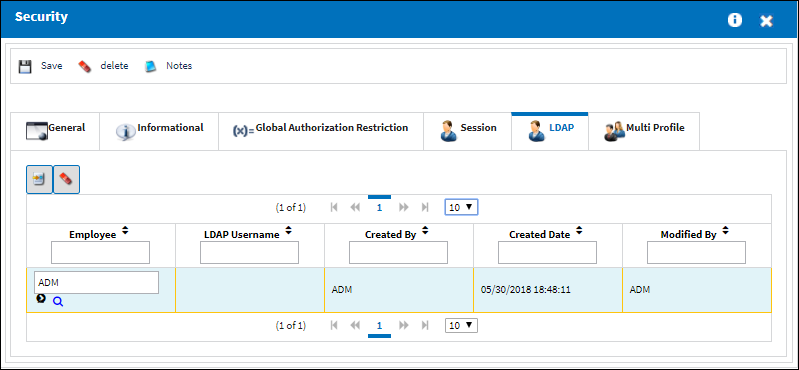
eMRO allows users to login using their LDAP credentials (Lightweight Directory Access Protocol). This option maps an employee's LDAP username to a specific username in eMRO.
 The LDAP function only applies to customers who have the LDAP Interface set up. For more information consult an eMRO Interface Administrator.
Before creating an LDAP record, be sure the LDAP Username field has been populated and saved in the Employee Master, Optional tab. For additional information, refer to Employee Master, Optional Tab via Employee Master which can be found in the Settings Training manual.
Select the New  button to create one or multiple LDAP employee records.
Note: Multiple employees can be linked to the same eMRO user, but a single employee cannot be linked to more than one eMRO User.
The following options are available in this window:
_________________________________________________________________________
Employee
The name of the employee the LDAP record is being created for.
LDAP (Lightweight Directory Access Protocol) Username
The LDAP username of the employee.
Created By
The user who created the record.
Created Date
The date the record was created.
Modified By
The user who last modified the record.
_________________________________________________________________________
Select the Delete  button to delete one or more records.
For more information regarding the sign-on function refer to the LDAP Sign On Method via the System Administration Training Manual.
Download Online Help
Print
|
©1997-2018 Trax USA Corp. All rights reserved. This manual may not be copied, photocopied, reproduced, translated, or converted to any electronic or machine-readable form, in whole or in part, without prior written approval from Trax USA Corp. |
 |