 Download Online Help
 Print
|
|
|
|
|


Web Print Selection Button, via Control Panel
When a Print window is selected in the Control Panel, system administrators can choose individual reports to be accessible or inaccessible by selecting the WPS button (Web Print Selection).
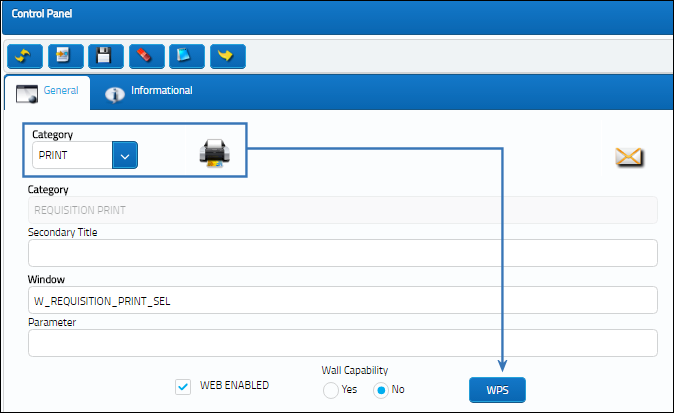
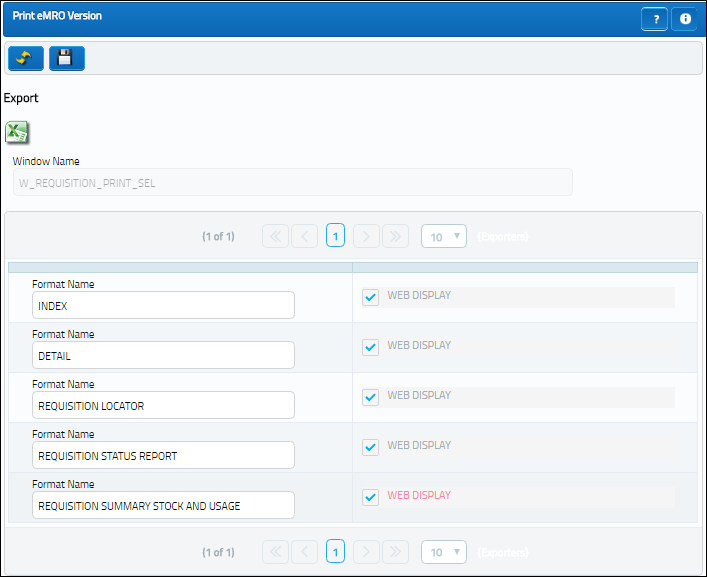
When selected, the Print eMRO Version window appears. Each report from the Print window is listed with the Web Display checkbox to the right. Select or deselect the Web Display checkbox to either include or remove the specific report from the Print window.
Download Online Help
Print
|
©1997-2018 Trax USA Corp. All rights reserved. This manual may not be copied, photocopied, reproduced, translated, or converted to any electronic or machine-readable form, in whole or in part, without prior written approval from Trax USA Corp. |
 |