
 Share
Share
 Print
Print
|
|
|
|
|


SGML Doctype
The System Transaction Codes are displayed with both the Code Names and Descriptions. The Code Descriptions directly illustrate their functionality and role in the system, as fields are populated and tasks are performed.
Transaction Code: |
SGML Doctype |
General Description: |
The SGML Doctype to be used when loading an SGML file. |
Are Authorization Steps Available? |
No |
Is System Notification Available? |
No |
Trax Control Panel Path(s): |
TraxDoc/ Update/ TraxDoc Master |
Available Functionality:
When loading an SGML file into a TraxDoc document, the SGML Doctype field (Optional Tab) is mandatory. The list of doctypes provided below are hard coded in the system. Selecting one of these doctypes ensures that the manual being loaded and imported is mapped correctly. Additional (non hard coded) SGML Doctypes can be created via this Transaction Code but can only be associated to TraxDoc that are used as a repository.
TRAX displays the following:
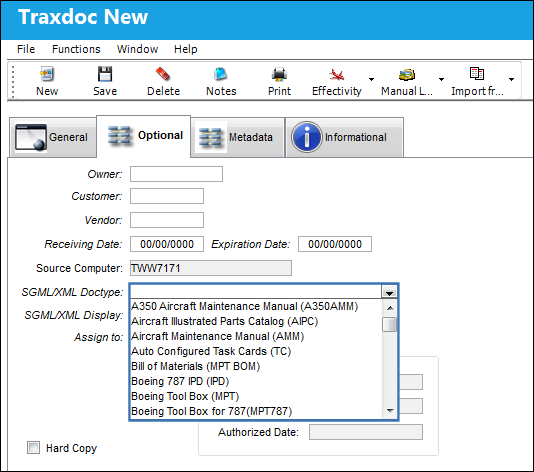
Hardcoded Doctypes supported by TRAX:
- A350AMM
- AIPC
- AMM
- TC
- MPT BOM
- IPD
- MPT
- MPT787
- MTCM
- EIPC
- EMM
- FRMFIM
- Graphic Repository

- MPD
- MEL
- MELCU
- NDT
- OMP
- TSM
For additional information, refer to the TraxDoc Document Detail, Optional Tab, via the TraxDoc Master of the TraxDoc Training Manual.
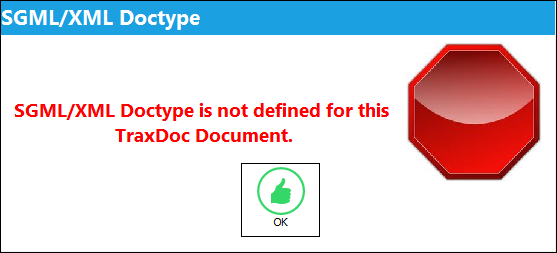
If when loading SGML content, and the SGML Doctype field is not defined, TRAX displays this warning dialog box and will not allow you to load the document:
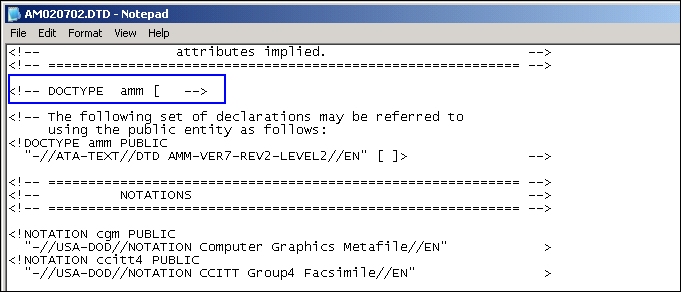
The SGML Doctype is defined in the .dtd file of the SGML that the user is loading:
Share
Print
|
©1997-2026 Trax USA Corp. All rights reserved. This manual may not be copied, photocopied, reproduced, translated, or converted to any electronic or machine-readable form, in whole or in part, without prior written approval from Trax USA Corp. |
 |