
 Share
Share
 Print
Print
|
|
|
|
|


The TraxDoc Document Detail, Optional tab allows the user to enter the following optional information to the TraxDoc.
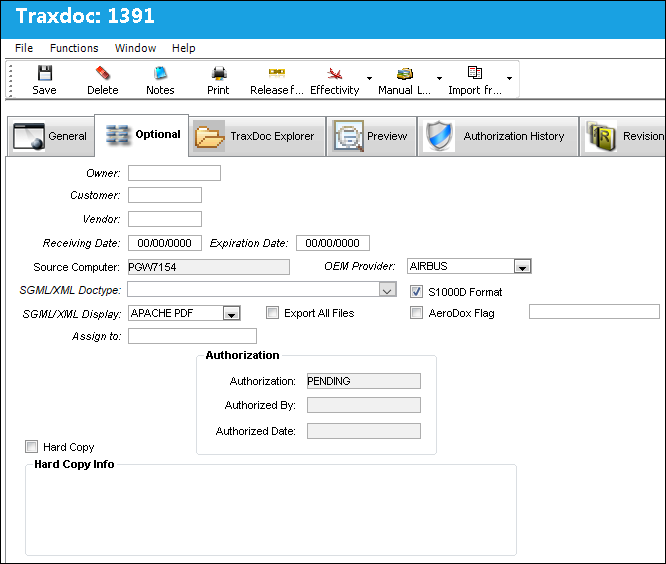
The following information/options are available in this window:
_____________________________________________________________________________________
Owner
The name of the owner of the manual.
Customer
The Customer that the TraxDoc was created for.
Vendor
The Vendor in which the TraxDoc was created from.
Receiving Date
The date of the document is received.
Expiration Date
The expiration date of the document.
Source Computer
The computer that the TraxDoc Document was created on. This Filed is auto populated with the Computer Name from Windows System Properties.
OEM Provider drop down menu 
The manufacturer providing the manuals for import:
- Airbus
- Boeing
- Boeing Toolbox
- Bombardier
- Embraer
- Non Boeing Toolbox
- Other
- Pratt and Whitney
SGML/XML Doctype
The Doctype is required to load SGML/XML content into the TraxDoc Document. Select from one of the following SGML/XML Doctypes:
Aircraft Illustrated Parts Catalog (AIPC) - The AIPC creates P/Ns, vendor codes and sets effectivity and P/N interchangeability. The manual is divided using ATA 100 chapters. The manufacturers for this manual are Boeing-Airbus, Embraer and Bombardier-Fokker.
Aircraft Maintenance Manual (AMM) - The AMM describes the procedures on how A/C maintenance shall be carried out. The manufacturers for this manual are Boeing-Airbus, Embraer, and Bombardier-Fokker.
Auto Configured Task Cards (TC) - The TC/ACTC automatically creates T/Cs & E/Cs. The manufacturer for this manual is Boeing.
Bill of Materials (MPT BOM) - The MPT BOM is used to create parts from a manual that is first loaded. The manufacturer for this manual is Boeing.
Boeing 787 IPD (IPD) - The IPD manual creates P/Ns with the P/N information (similar to the AIPC), only the data is provided via .CSV file, not SGML data. The manufacturer for this manual is Boeing.
Boeing Tool Box (MPT) - The MPT provides maintenance program data from Boeing's Toolbox for planning and execution. It also creates T/Cs and E/Cs and automatically links them. The manufacturer for this manual is Boeing.
Non Boeing Tool Box (NBMPT) - The NBMPT handles any C-Series and other Non-Boeing native data imports. This is a customized interface intended for specific customers. For any inquiries, please contact Trax Support.
 Note: This Doctype is part of a customized interface and is therefore not applicable to most TRAX customers. Please contact Trax Support for any inquiries.
Boeing Tool Box for 787 (MPT787)  - The MPT787 provides maintenance program data from Boeing's Toolbox for planning and execution. It created T/Cs and E/Cs and automatically links them. It uses a custom XML schema export. The manufacturer for this manual is Boeing.
Bombardier Maintenance Task Card Manual (MTCM)  - The MTCM creates T/Cs for Bombardier fleets (CRJs and Dash). The manufacturer for this manual is Bombardier.
Engine Illustrated Parts Catalog (EIPC) - The EIPC creates P/Ns, vendor codes, and sets effectivity and P/N interchangeability for engines. This manual is provided by the engine manufacturers themselves and manufactured by General Electric.
Engine Maintenance Manual (EMM) - The EMM creates T/Cs for engine ATAs that describe how maintenance T/Cs should be carried out on an engine. This manual is provided by the manufacturer themselves.
Fault Isolation/Fault Repair Manual (FRMFIM) -
Graphic Repository  - A graphic repository was created to store the graphics for panels and zones. Having this repository makes it unnecessary to load graphics every time a revision is made to a TraxDoc.
Line Maintenance CSDB (LM_CSDB) - The Line Maintenance CSDB is a technical publication that contains information related to line maintenance requirements of the aircraft. It could contain multiple manuals such as the AMM, IPD, SRM, NDT, FIM, and in some occasion it may also contain MPD and the EIPC and EMM.
Maintenance Planning Documents (MPD) - The MPD manual is published by OEMs in order for the airline to develop a maintenance program. It will create T/C shells and E/Cs. The manufacturer for this manual is Airbus and Boeing.
Master Minimum Equipment List (MEL) - The MEL manual provides an approved list for a particular A/C type that includes items that may be unserviceable at the start of a flight. The manufacturer for this manual is Airbus.
Master Minimum Equipment List Custom (MELCU) - The MELCU manual allows airlines to create their own MEL following manufacturer specifications. The manufacturer for this manual is customer specific for operators.
Nondestructive Testing Manual (NDT) - The NDT creates T/Cs to have A/C components inspected before they are assembled into the A/C and periodically inspected throughout their life cycle. The manufacturer of this manual is Embraer and Airbus.
Service Bulletin (SB) - The SB communicates details of modifications which can be embodied in A/C and engines. Also creates T/Cs and E/Cs and automatically links them. This is submitted by the OEM. The manufacturer for this manual is Airbus and Boeing.
Troubleshooting Manual (TSM) -
For additional information regarding the above doctypes, refer to SGML Doctype Imports via the Import From OEM Button which can be found in the TraxDoc Training Manual.
The user must access the SGML Transaction code folder in order for the system to create the doctypes. If these doctypes are not generated, the user will receive an error when attempting to populate and save this field.
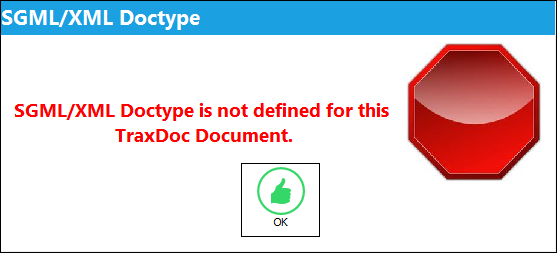
When attempting the Load XML process, if the SGML DocType is not defined in the TraxDoc Document, Optional Tab, the following pop up will appear:
 Note: In Trax Version 15 and all later releases, the SGML Doctype transaction codes necessary for OEM Imports will be auto populated upon selecting the SGML/XML Doctype drop down menu. Users may still add customized doctype transaction codes for repository TraxDocs.
Refer to the Manuals Type Index for a full listing of all manual types that can be imported into TRAX.
S1000D Spec checkbox
Select this checkbox if the manual being imported is formated using S1000D schema. S1000D manuals are organized differently than non-S1000D manuals; this checkbox prepares the TraxDoc load to recognize the format of the manual. If not selected for a manual using S1000D schema, the system will not follow the S1000D standards and the fields in the manual will not be mapped properly in the main system when records are created.
Note: OEM manuals are typically formatted in three different schemas: S1000D, Spec22000, or custom specifications that don't follow the other two formatting conventions. For a listing on which TraxDoc doctypes are formatted in the different schemas, refer to the SGML Doctype Imports.
SGML/XML Display
Select the format in which the file is to be displayed in:
- APACHE PDF
Export All Files checkbox
Select this checkbox to export all files.
AeroDox Flag checkbox
Select this checkbox to flag a document as an AeroDox document. Once flagged, this document will be exported to the AeroDox app once an open revision for it becomes authorized.
Note: This field is designed for AeroDox users.
AeroDox Export Status
Displays the current progress of the export process for the AeroDox file. It can display one of three states:
- INILOAD - Displayed when the AeroDox Flag is initially selected.
- READY - Displayed when the AeroDox document is ready to be exported
- INPROGRESS - Displayed when the AeroDox document is currently being exported.
Note: This field is designed for AeroDox users and appears when the AeroDox Flag is checked.
Assign to
The employee the TraxDoc was assigned to.
Authorization
The authorization status of the TraxDoc.
Authorized By
The user who authorized the TraxDoc.
Authorized Date
The date the TraxDoc was authorized.
Hard Copy checkbox
Check to indicate that a Hard Copy of the document exists, populate the appropriate Hard Copy fields that appear once the Hard copy checkbox is selected.
Source Media
How hard copy is stored (i.e. CD, flash drive, print etc.).
Department
The department in which the source media can be found.
Division
The division in which the source media can be found.
Section
The section in which the source media can be found.
Location
The exact physical location in which the source media can be found.
_____________________________________________________________________________________
Share
Print
|
©1997-2026 Trax USA Corp. All rights reserved. This manual may not be copied, photocopied, reproduced, translated, or converted to any electronic or machine-readable form, in whole or in part, without prior written approval from Trax USA Corp. |
 |