
 Share
Share
 Print
Print
|
|
|
|
|


The TraxDoc Master provides several methods for entering electronic files into TraxDoc.
Fill in the mandatory fields on the General Tab and any other optional fields as necessary in the General, Optional, and Metadata Tabs. Refer to the appropriate sections of this manual for more information on the TraxDoc Document Tabs.
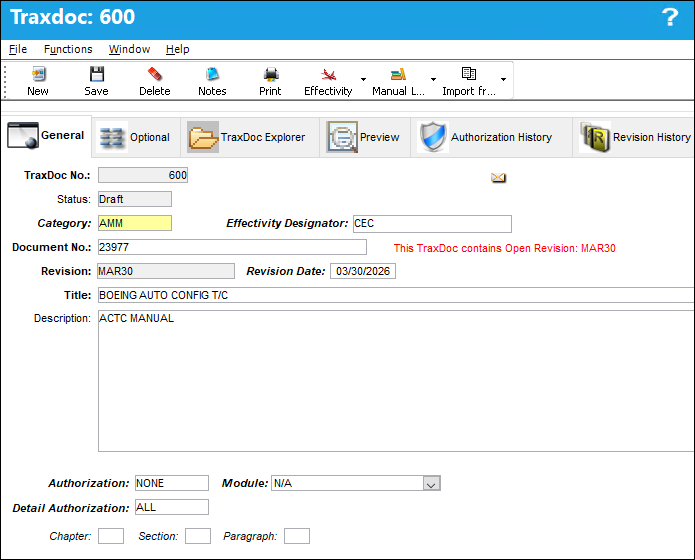
The following information/options are available in this window:
_____________________________________________________________________________________
TraxDoc No.
The TraxDoc Document ID number, which is automatically generated by the system.
Status
The Status of the document. This is auto-populated by the system.
Open - This indicates that it is a revision to a previously released version.
Draft - This indicates that this is a new document.
Category
The document's category. The Category is set up via Settings/Explorer/System Transaction Code/TraxDoc/TraxDoc Category. When this field is entered, the Authorization field is automatically populated only if the TraxDoc Category transaction code contains a Default Authorization.
Effectivity Designator 
The type of designator used in the sgml documentation to apply effectivity to an A/C Type/Series: CEC, Line Number, or MSNBR.
Document No.
The document's number.
Revision
The document’s current revision number. Each TraxDoc can have multiple revisions as the data/records created through the TraxDoc will need to be updated (revised) regularly depending on the requirements of the aircraft manufacturer, regulatory agency, airline, etc.
Revision Date
The document’s current revision date.
Title
The document’s title.
Description
A description of the document.
Authorization
The Authorization Routing that this document should undergo. The Authorization Routing determines the steps that will be required in the document’s Authorization Process. This field is automatically populated once the Category field is entered only if the TraxDoc Category transaction code contains a Default Authorization.
The Authorization Routing is set up via Settings/Explorer/System Transaction Code/TraxDoc/TraxDoc Authorization Routing.
Module
The module where the document exists in Trax. If a TraxDoc Document exists in another Trax Module select the Module and then the document:
N/A - Select if it does not exist in a Trax Module.
Library - If a hard copy exists in the Library Module, select Library and select the manual in the Manual field.
E/C - If it exists in the Engineering Module as an E/C, select Engineering - E/C and select the E/C in the E/C field.
MEL - If it exists in the MEL Master, select MEL Master.
Detail Authorization
The Temporary Revision Authorization routing that determines the authorization steps for the temporary revision. This field is configured similarly to the Authorization field, but it is only used for temporary TraxDoc revisions.
E/C
The Engineering Control the TraxDoc is associated to and utilized for.
Preview  button
Select the Record Locator button. TRAX displays the record that the TraxDoc is linked to. For additional information regarding the Engineering Control, General Tab, refer to the Engineering Manual.
Chapter
The ATA chapter reference (if applicable).
Section
The ATA section reference (if applicable).
Paragraph
The ATA Chapter/Section/Paragraph (if applicable).
_____________________________________________________________________________________
Additional functionality is available with the TraxDoc Notification.
Share
Print
|
©1997-2026 Trax USA Corp. All rights reserved. This manual may not be copied, photocopied, reproduced, translated, or converted to any electronic or machine-readable form, in whole or in part, without prior written approval from Trax USA Corp. |
 |