
 Share
Share
 Print
Print
|
|
|
|
|


The Metadata Tab contains optional informational MetaFields that are defined by your organization. They are set up by Trax Administrators or Advanced Trax Users. The MetaFields are created in the System Transaction Configuration and the field’s contents are defined in the System Transaction Codes. Up to 8 MetaFields are available. If none of the MetaFields are defined this tab will contain a blank page. The Meta Fields are used to add additional optional information to a TraxDoc Document. The Meta Fields can also be used for searches in the TraxDoc Database and are also available in the TraxDoc Query.
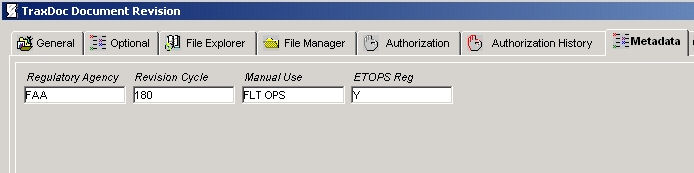
Enter/verify the following information.
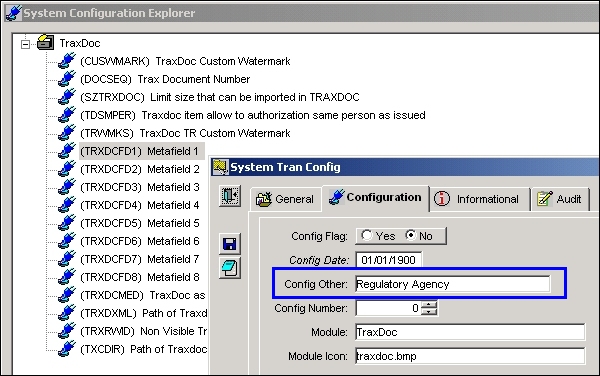
Create a TraxDoc MetaField. Go to System Administration/Explorer/System Transaction Configuration/TraxDoc. Right-Click on a Metafield and select ‘Update Record.' Go to the Configuration Tab. Enter the name of the field in the Config Other Field.
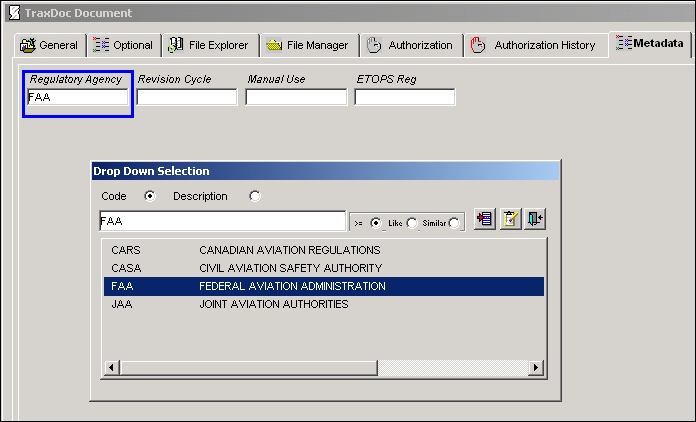
Create Transaction Codes for the Metafield. Go to Settings/Explorer System Transaction Code/TraxDoc. Right-Click on any TraxDoc MetaField and click Update.
_____________________________________________________________________________________
System Code
Enter a name for the code (maximum 10 characters).
It is recommended that you choose a name, abbreviation, or acronym that reflects the code.
System Code Description
Enter a description of the category or the full name of the code.
_____________________________________________________________________________________
The MetaFields are now available in the TraxDoc Document on the Metadata Tab.
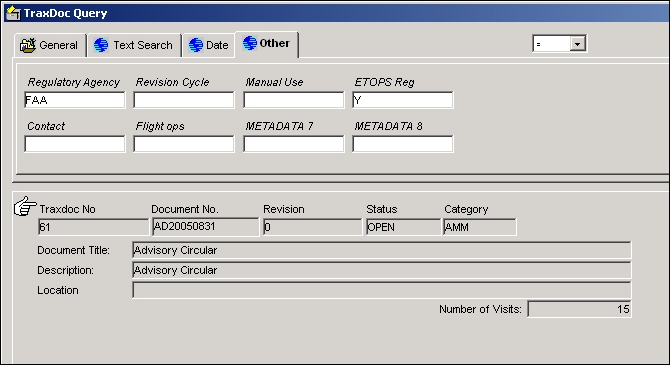
The MetaFields are also available for TraxDoc Queries.
Share
Print
|
©1997-2026 Trax USA Corp. All rights reserved. This manual may not be copied, photocopied, reproduced, translated, or converted to any electronic or machine-readable form, in whole or in part, without prior written approval from Trax USA Corp. |
 |