
 Share
Share
 Print
Print
|
|
|
|
|


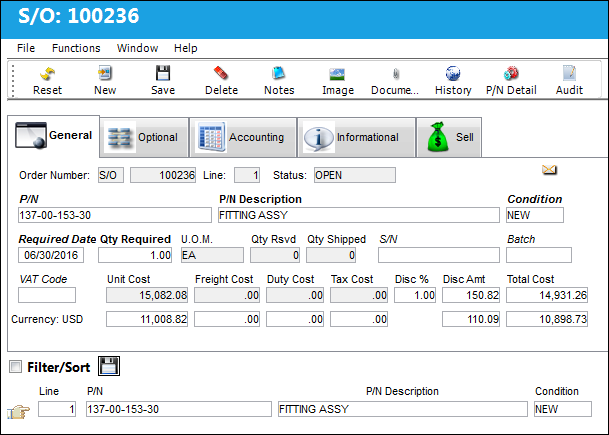
Once the Customer Order header information has been completed and saved, the Customer Order Detail Screen is displayed as follows:
Please note that the system does not consider interchangeable parts when creating a Picklist for Sales Orders. When trying to reserve the actual part, the system will generate an error. For additional information, refer to the Picklist Button, via Customer Orders.
 The second row of Costs/Fees automatically converts the main currency with the Customer's Currency. The Customer's Currency is displayed to the left of the values and is informational. See below for more information on all of these figures.
The following information/options are available in this window:
_____________________________________________________________________________________
P/N
The Part Number reference for the aircraft part. This is the part number that the user is sending to the customer.
P/N Description
The description of the part.
Condition
The condition of the item that the user is sending. This will default if S/N is selected.
Required Date
The date that the item(s) is/are required by.
Qty Required
The quantity of items/parts required.
UOM
The unit of measure. This will default if associated with a Part Number as defined in the P/N Master. Transactions for parts can be conducted in a different UOM than defined in the P/N Master. However, upon receiving the UOM, conversion will automatically adjust the quantities, providing that the conversion rate is defined in the UOM System Transaction Code (via Setting/Explorer/System Transaction Code).
Unit Cost
The unit cost of the part being sold to the customer. This field automatically defaults to the Unit Sell price listed for the part via the Sell  button for the Condition listed. If there is no Unit Sell price for the part or for the part Condition, then the field will be left blank and must be populated manually. For more information refer to the Sell Button via the P/N Master section of the Settings Training Manual.
If there is no Unit Sell for the Condition via the Sell button, then the part's Average Cost from the P/N Master, Costing Tab will populate the Unit Cost field (if available). For more information refer to the P/N Master, Costing Tab via the Settings Training Manual.
When Switch  CCLISTCOND set to Yes, an S/O's Unit Cost is defaulted based on the Condition tran code's S/O Unit Cost Percent and the part's Unit Sell price. The part's Unit Sell price must have a Condition NEW value; the switch's Config Other field is not validated.
A Markup percentage can be applied to the Unit Cost for specific Customers via the Default Markup S/O field in the Customer Master, Sell/Rental tab. When added, the markup percentage is multiplied against the Unit Sell price (from the Sell Button) or the part's Average Cost; the result is the Markup amount which is added to the S/O's Unit Cost automatically. If there is neither a Unit Sell price for the part Condition nor an Average Cost for the part, then the Markup is not applied to the Unit Cost. For more information refer to the Customer Master, Sell/Rental Tab via the Settings Training Manual.
Freight Cost
The associated freight cost/fees, if applicable.
Duty Cost
The customs duty cost (if applicable).
Tax Cost
The tax cost (if applicable).
Taxes can be applied to Orders automatically by entering Goods and Services Tax (GST) information for the specific Customer/Vendor entered into the header window. The tax percentage and applicable G/L Account can be entered via the Settings Master, Optional tab. The Tax Cost is added when a Unit Quantity and Cost are entered. For more information refer to GST Functionality (Customer) via the Settings Manual.
VAT Code
Allows the user to add a Value After Tax percentage to the order. This is set up through the VAT Code System Tran Code.
Qty Reserved
The quantity of items on reserve status.
Qty Shipped
The quantity of items of the shipment.
Disc %
The percentage of discount.
Disc Amt
The calculated discount amount.
Total Cost
The total cost of the order, which includes all line items' quantity multiplied by any additional fees or cocts, such as Freight, Duty, Tax, etc.
S/N
The specific Serial Number associated to the part of the Customer Order.
Batch
The inventory number that is currently associated with a part or group of parts. A part's Batch number can change after various types of transactions take place.
Currency
The currency that will be used for the order transaction. Currencies may be defined for the Customer/Vendor in the Customer/Vendor Master and overridden at the order level. For additional information, please refer to the Currency section of the G/L Interface, System Transaction Code Training Manual. This field is informational in the Detail window.
_____________________________________________________________________________________
 Unit Cost Default:
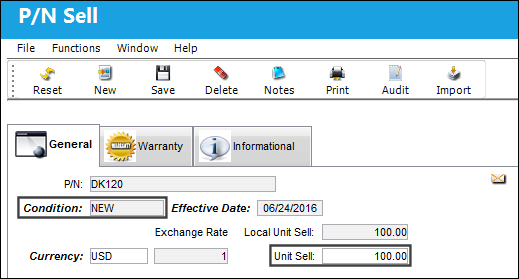
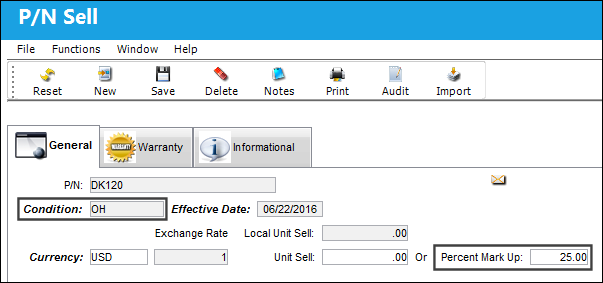
The system will automatically multiply the Unit Sell for Condition NEW by the Percent Mark Up in the second Condition applied to the part via the P/N Sell, General tab. This way, the sell price for any Condition entered in the Sales Order is a percentage based on the Part's 'NEW' price. (The part with Condition 'NEW' would in effect be the highest selling price of the part). For more information, refer to the Sell button, via P/N Master.
In the following example, Condition NEW has a Unit Sell of 100.00:
Condition OVERHAUL has a Percent Mark Up of 25.00:
Create a Customer Order with Condition OVERHAUL. As soon as the Save  button is selected, the Unit Cost auto populates with 25.00:
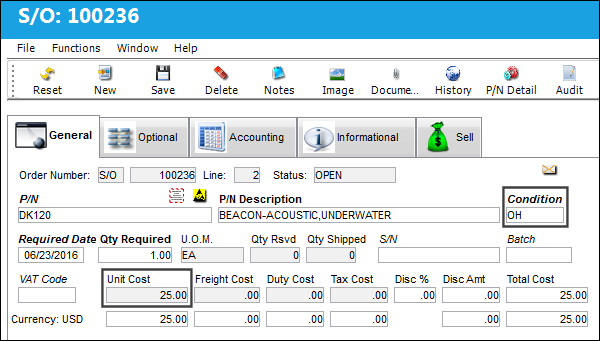
Unit Sell (Condition NEW) 100.00 X Percent Mark Up (Condition OVERHAUL) 25.00 = SO Unit Cost
100.00 X 0.25 = 25.00
Warnings:
When an order created for an interchangeable part with a Requisition is saved, if the alternate part is not effective to the main part's A/C Type/Series, a soft warning appears indicating the discrepancy in A/C Effectivity. For more details refer to the Transfer Order Detail, General Tab via the Orders Training Manual.
Share
Print
|
©1997-2026 Trax USA Corp. All rights reserved. This manual may not be copied, photocopied, reproduced, translated, or converted to any electronic or machine-readable form, in whole or in part, without prior written approval from Trax USA Corp. |
 |